
PowerMTA & Postal Deployments
High-volume MTA setup with virtual MTA pools, throttling pipes, and automated backoff rules for Gmail and Yahoo.


Get reliable SMTP email server and Setup Own Email Server service for the best email service for business.
Enterprise Mail Transfer Agents & Delivery Suites
Turnkey Email Infrastructure
Stop landing in spam. Our email delivery specialists build bulletproof self-hosted email infrastructure with automated IP warming and reputation monitoring.
High-volume MTA setup with virtual MTA pools, throttling pipes, and automated backoff rules for Gmail and Yahoo.

Full strict SPF, 2048-bit DKIM crypto keys, DMARC p=reject policies, and Google Postmaster Tools integration.

Gradual volume escalation schedules programmed to build positive sender reputation with major mailbox providers.

Automated handling of hard bounces, transient errors, and FBL spam complaints to keep contact lists clean.

Full campaign manager installation with tracking domain SSL, custom headers, and transactional API integrations.

Strict rDNS (PTR) matching hostnames and continuous real-time monitoring across 100+ global spam blacklists.

Send millions of emails per month for the flat cost of your VPS rather than paying per-contact SaaS fees.
Own your dedicated IP pool without sharing risk with bad senders on shared email networks.

Eliminate arbitrary third-party daily send limits and customize every header parameter to your exact campaign needs.
Starting at
single server setup
Order SMTP SetupStarting at
complete engine
Deploy Pro StackStarting at
per month / pool
Subscribe Delivery OpsSide-By-Side
| Feature | HostsCheap | SendGrid / Mailgun ($$$) | Shared cPanel Webmail |
|---|---|---|---|
| Monthly Cost for 1,000,000 Emails | ~$35 (Flat VPS) | $450 - $800/mo | Blocked by Host |
| Dedicated IP Reputation | 100% Dedicated | Paid Tier Only (+$90) | Shared with 1,000s |
| Custom DMARC & BIMI Setup | Included | Self-configured | Limited |
| Arbitrary Account Suspensions | Never (Self-Hosted) | Common Risk | Very High |
| Automated Bounce & FBL Handlers | |||
| Custom PowerMTA Routing Config |
We enforce strict cryptographic authentication and reputation safeguards to ensure mail passes rigorous modern ISP spam filters.
Customer Stories
“We were paying SendGrid over $1,200/mo for our SaaS notification emails. HostsCheap deployed Postal on a $40 dedicated box and our inbox rate actually increased.”
“Their PowerMTA configuration solved our Gmail spam folder nightmare. They set up proper IP rotation and backoff rules. Mail-tester score went straight to 10/10.”
“Setting up MailWizz with multiple SMTP servers seemed daunting until their team handled it in one afternoon. Running smoothly for over a year.”
Optimize your company's email with our business email server setup service – efficient, secure, and tailor-made for your needs. Looking for the best SMTP email server service to set up your own server for business email? Check out our top recommendations for the best email service for business.
$300.00 USD One Time Setup Fee
GigID : ES-ZIMBRAIS-607 Delivery 05 Days
Zimbra offers the business mail service installing solution for almost all business enterprises. The service helps the business enterprises to configure Zimbra Business Server email server and also helps in migrating Zimbra Desktop and Web clients. Though it is a time taking process, but the server expert helps you through the process with the help of Callcenter chat support from zimbra live chat.If you want to get your business email working with Zimbra software from nightfall to small hours of the morning, our well-trained tech team is ready for you. Our consultants will help you get the most out of your Zimbra Business Email.
✅ Zimbra Open Source Edition Installation
✅ 1 Domain & 1 IP Setup
✅ SSL certificate Installation
✅ SPF Setup similar with Existing Configuration.
✅ DKIM Setup similar with Existing Configuration.
✅ DMARC Setup similar with Existing Configuration.
✅ rDNS Setup.
✅ Spam Filter setup if Requirements!.
$300.00 USD One Time Setup Fee
GigID : ES-IREDMI-603 Delivery 05 Days
Do you need an iRedMail server setup? Please feel free to contact us at anytime and we'll be able to assist you with setting up your own iboss mail server. Our team has worked hard to establish ourselves as a leading provider of iRedMail servers, and would be honored to help you get started as well. Don't know how to set up iRedMail? Not a problem for iRedMail experts. Our system administrators are ready to install iRedMail to your server at the best price. Get one-click-to-configure script installer and get help of the top attackers with solid knowledge of advanced security configurations.
✅ iRedMail - Open Source Server Installation
✅ 1 Domain & 1 IP Setup
✅ SSL certificate Installation
✅ SPF Setup similar with Existing Configuration.
✅ DKIM Setup similar with Existing Configuration.
✅ DMARC Setup similar with Existing Configuration.
✅ rDNS Setup.
✅ Spam Filter setup if Requirements!.
$300.00 USD One Time Setup Fee
GigID : ES-RWIS-606 Delivery 05 Days
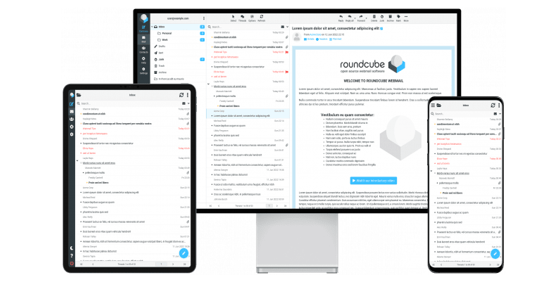
The one thing every website needs is a webmail, and Roundcube is the best choice out there. It's easy to use and set up, but it doesn't have an easy installation method for a non-developer type. So we're here to help you get started with Roundcube quickly by offering a mail server installation service. Those that want to have a professional email client in their web server can rely on roundcube installation service. The application has many features and is very simple to use. It is quite different from the other webmail providers that only offers limited features.
✅ Roundcube webmail Installation
✅ Postfix, Dovecot & Mysql Installation
✅ 1 Domain & 1 IP Setup With Virtual Host
✅ SSL certificate Installation
✅ SPF Setup similar with Existing Configuration.
✅ DKIM Setup similar with Existing Configuration.
✅ DMARC Setup similar with Existing Configuration.
✅ rDNS Setup.
✅ Spam Filter setup if Requirements!.
A good email server setup service is one of the essentials of any business that enables effective and secure email communication, allows businesses to have a professional appearance due to custom domain names, and also includes features that secure their data and shield them from threats like phishing. Choosing a business email server setup service includes determining what the objectives of the business are, and looking for the desired storage and bandwidth.
There are several steps to undertake during the setting of the business email server, and cost factors can differ between small and medium organisms and the large organisms. It is advisable to look at some of the top companies offering business email server setup services to look at server availability and support to clients. Great info including contacts, which is superior to other conventional forms of safeguarding data, needs to be protected by advanced options like encryption and updates on a periodic basis.
In conclusion, focusing on a business email server setup service is a very beneficial practice that goes a long way in enhancing the communication via email and the wellbeing of the organization in general.
Key Takeaways:
A good email server setup service is important for effective communication via email and enhancement of the reliability of the business. When deciding what business email server setup service to acquire, look at the various cognition and intersection offerings. Advanced options such like contact integrations which may be superior to the common options including datashould undergo constant updates for reliable storage.
Integrating business email with productivity tools and utilizing unified communication platforms improve collaboration and enhance efficiency. Scalability is necessary for expanding firms. One of the emerging trends in the future of e-mail hosting is growth that will keep pace with the number of e-mail users and cutting-edge technology for e-mail security and management.
One of the most significant levels for businesses looking to preserve a professional image and communicate securely is to set up their Own Email Server. This section will focus on the key purposes of using business through Setup Own Email Server, especially custom domain email, its digital security features, and how it helps build brand awareness and generate ROI.
Having a custom domain email creates a certain degree of professionalism and credibility to your enterprise. There is nothing worse than using an email address that is not only generic but also provided by an email provider such as "yourbusiness@gmail.com." On the other hand, it is important to note that having an email address such as “name@yourbusiness.com” strengthens the branding. This supports professionalism and instills confidence in customers and partners. The use of custom domain names by business emails will definitely enhance the image as well as the reputation of every recipient.
Business email providers ensure advanced security features that protect accounts from any phishing attempts or data breach and other cyber threats. These features ensure extra security for all your private data and communication. End-to-end encryption is an example of a feature that makes sure only the email recipients are able to access the email. There are also anti-phishing tools and spam filters that promote safety in email communication and reduces chances of being attacked. The email hosting service has regular security patches and updates that protect it from high-end threats that may endanger the email communication environment.
By using business email hosting, brand visibility and return on investment (ROI) can tremendously improve. Utilizing an email address from a domain website owned by you generates and enhances your brand while creating a good impression to the audience. Branded emails which accompany the visuals and messages related to the business help boost the brand image and also create an impression of professionalism on the contacts. Also, with the right email hosting services, the chances of bouncing emails are reduced which in turn drives the chances of increased open and feedback rates. This increased interaction may come with enhanced returns for your business in the form of sales or in the form of building good bonds with clients and customers.
When it comes to email hosting, there are many kinds of email hosting that the businesses may decide from. For small businesses operating under tight financial limits, shared email hosting can come in handy and prove as an economical approach. This form of sharing server resources with users and other servers helps in reducing the costs. With shared hosting, users however can be restricted within certain limitations in terms of personalisation and performance.
When a business does not want its emails hosted in-house, it can use external emails through third party email hosting. This is more secure and efficient than using shared hosting. In the case of third-party-sponsored networks, organizations have increased possibilities to tailor their email accounts and settings as they see fit.
Like any other information exchange media, emails your company might send or receive also has to follow other specified communication protocols. It is vital for businesses that leverage email and its hosting services to familiarize themselves with these protocols. This section focuses on three of the essential elements of e-mail protocol, namely IMAP, SMTP and POP3.
The Internet Message Access Protocol is one of the well-known and most preferred means of Email Synchronization between different devices. IMAP allows users to retain email accounts on several devices and access their messages from any such device that has the account configured. Any action, be it deleting or moving emails from one device will be completed on all the devices that have the account set up. IMAP makes sure that users do not need to worry about which device to sign in to, since all of their emails on any device will look the same and be up to date.
SMTP is the acronym for Simple Mail Transfer Protocol, and it remains the dominant protocol used in transmitting emails. This protocol essentially describes how emails travel from the email client to the recipient's mail presence. Thus, whenever you write and send an email, your message is sent by SMTP which is integrated within your client when it needs to connect to the recipient’s server for the email transmission. SMTP's function is to make sure that emails are sent and they are sent reliably and in an efficient manner. Even email glitches manifest, the emails always go through.
POP3 is another commonly used email protocol and stands for Post Office Protocol version 3. This protocol eases the ability to transfer emails from a certain remote server to any local device. With the help of POP, you may obtain and keep your email information using your machine and even do so without being connected to the web. Hence, it provides a way to have email access even when offline, and this way, emails may be read, arranged, and replied to without actually being online. When you go back online, your device will merge with the email server, transforming it to relay what you have edited while disconnected to the internet.
Here’s a great opportunity for us to ‘test waters’ before diving deep in to get our attention focused on more challenging aspects like setting up domains, subdomains, creating business email accounts, etc. First things first, let’s ask this seemingly simple but deeply important question: what’s the email hosting for.
Almost every company today is equipped with an email marketing software that looks for specific qualities when choosing an email marketing service provider. Most of these tools allow marketing teams to run more targeted campaigns leading to a greater ROI. It is worth being always aware of how effective the chosen email host is and how the business will eventually benefit from choosing this service.
When you intend to setup an email server, one of the most important factors would be storage capacity and bandwidth options. Check what different businesses offer in terms of storage options so that you know it is enough for your present as well as future requirements. Also look at the different bandwidth options which providers have since this will mean quicker and efficient email transfers. Don't go for any email hosting that will limit or put your business email traffic in disruptions.
Every step has to be followed when commencing the process of establishing a business email server and this is primarily for the purpose of making sure there is an effective email communication. Looking into these steps allows you to set up a viable email server that is going to serve your business needs.
Among the many chosen options, choose unlimited email hosting that has the best features in relation to building your business email server. Pay regard to uptime, security, scalability and customer services.
Pick an email server software or a platform that fits your company's business needs. Some of the popular ones include the Microsoft Exchange Server, Zimbra Collaboration Suite, and Google Workspace.
Domain registration and hosting are essential elements in the email server setup process. However, these two components can be quite expensive. As with any email service setup, some challenges exist.
This price range saves money for a small or medium business. Because of lack of hardware resources, a small business may want to adopt a shared hosting plan that utilizes virtualization.
With larger businesses, more services are incorporated into the subscription package, raising the cost of the service.
The Best Business Mail Server Setup Provider in the Market: A Comparative Analysis
In business email server setup service, the selection of email service providers is a matter of great concern. Two of the essential issues to investigate include service uptime and reliability.
Service uptime is defined as the time period that an email server can operate without failed processes, downtimes or interruptions. This is an important aspect for your organization’s email transmission since it helps you to be able to send and receive emails at any time. While deciding on a provider always consider one that guarantees a high level of uptime as this will ensure a high level of email communication at all times.
Together with the uptime aspect of the services, reliability should also be taken into consideration. When it comes to email server providers, everything has to do with how much emphasis they put on structure and security and optimal performance is guaranteed. Regular server system maintenance is also assured so that there are minimal threats and the systems operate efficiently. This ensures that emails are sent and received on time while business communication is not disturbed due to system loss.
Customer support is then another aspect of concern when focusing on the best companies offering email hosting services for businesses. Real-time and competent provider assistance will solve all issues qu
Launch your dedicated high-deliverability email infrastructure with our senior email architects today.