
Nginx & Event MPM Tuning
Worker connections, keepalive pools, epoll event loops, and buffer sizes calibrated for heavy visitor loads.


Learn how to install and configure the best DNS servers for LAN and company needs with our professional service.
Optimized Web Server Technologies & Accelerators
Full-Stack Performance
Eliminate server bottlenecks, optimize database query execution, and cache assets close to your visitors.
Worker connections, keepalive pools, epoll event loops, and buffer sizes calibrated for heavy visitor loads.

Dynamic innodb_buffer_pool sizing, query cache retirement, thread concurrency limits, and slow query profiling.

Zero-RTT session resumption, OCSP stapling, and modern TLS cipher suites for instant SSL handshakes.

In-memory key-value caching offloads up to 90% of dynamic database queries for sub-second page rendering.

High-ratio byte stream compression reduces text payload transfer size by up to 80% without CPU spikes.

On-demand worker spawning prevents 502/504 gateway timeouts during sudden viral traffic surges.
Low TTFB and fast LCP directly increase organic Google search rankings and customer engagement.

Squeeze 3x more traffic capacity out of your existing hardware before needing to upgrade server sizes.

Say goodbye to 502 Bad Gateway and 504 Gateway Timeout errors during marketing sales campaigns.
Starting at
single service
Order Quick AuditStarting at
full server tune
Start OverhaulStarting at
per month / server
Subscribe GuardianSide-By-Side
| Feature | HostsCheap | Default Stock Server Config | WordPress Caching Plugins |
|---|---|---|---|
| Average Dynamic Page TTFB | 35ms - 75ms | 450ms - 1200ms | 200ms - 400ms |
| MySQL InnoDB Buffer Allocation | 70% Memory Tuned | 128MB Default | N/A (No DB tune) |
| HTTP/3 QUIC Protocol | |||
| PHP OPcache JIT Enabled | |||
| Handles Viral Concurrency Spikes | 10,000+ Req/sec | Crashes ~300 Req | Plugin Overhead |
| Before & After Benchmark Report |
Optimization done right never compromises security. Every tuning profile retains rigorous isolation controls.
Customer Stories
“Our WooCommerce catalog used to take 2.4 seconds to load product filters. After their MySQL and Redis overhaul, it takes 180ms. Sales jumped 22%.”
“We were getting 502 bad gateway errors every time an email newsletter went out. HostsCheap tuned our PHP-FPM pools and the server didn’t even flinch.”
“Before hiring them, we were about to spend $400/mo on a dedicated server upgrade. Their $89 tuning made our existing $40 VPS run like lightning.”
Elevate your network efficiency with our Optimize Network with Company DNS Server & LAN DNS solutions. Secure, reliable, fast. Looking to install and configure the best DNS servers? Learn how to set up LAN and company DNS servers with our comprehensive installation service.

$120.00 USD One Time Setup Fee
GigID : WHS-CWPNS-901 Delivery 03 Days
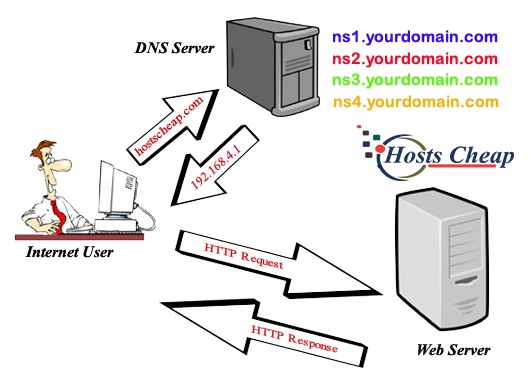
If we talk about the best web hosting company, then HostsCheap should be one of the choices. And to prove it, we have written this article on Setting Up WHM Private Nameservers For Web Hosting Company. Private nameservers are a good solution for authoritative domain name resolution of your top-level domain (the domain that end users type in their web browsers) in a private network. Let’s say you have secure internal network and want to have control on the way you resolve your domain names in it. Then private nameservers for Web hosting company could be a reasonable choice as long as they are handled by you or by managed service provider, who is common with tasks like this. The Internet hosting company we use for our customers generally offers robust services. However, There are some sophisticated functions that are not offered by the aforementioned entity. if your site needs these extras, then you have to do a little bit of extra work. It's not difficult to do, though.
✅ Register Private Name Server
✅ Configure ns1.yourdomain.com
✅ Configure ns2.yourdomain.com
✅ Configure ns3.yourdomain.com
✅ Configure ns4.yourdomain.com
✅ Configure Private Name Server In WHM/cPanel
$120.00 USD One Time Setup Fee
GigID : WHS-CWPNS-901 Delivery 03 Days
Setting up CPanel and CWP Private Nameservers for a web hosting company is a good idea to do if you are the owner of an internet business. This article will briefly explain some basic details of why private nameservers are used as well as how to set them up with CWP. Setting Up CWP Private Nameservers For Web Hosting Company If you are in Web hosting business, then the control panel is the most important thing for your business. If you have a private nameserver then you get much more advantages like online backup, recovery and easy to speed up everything. Private Nameservers: Although our public nameservers will continue to function as they do today, in order to take full advantage of CWP's benefits, your site will need to be configured to use CWP's private name servers.
✅ Register Private Name Server
✅ Configure ns1.yourdomain.com
✅ Configure ns2.yourdomain.com
✅ Configure ns3.yourdomain.com
✅ Configure ns4.yourdomain.com
✅ Configure Private Name Server In WHM/cPanel

$120.00 USD One Time Setup Fee
GigID : WHS-CWPNS-901 Delivery 03 Days
Are you tired of remembering a range of IP addresses as server addresses simply because you host and develop websites for many clients? Are you getting countless 404 Not Found errors on your websites? Choosing Howto-set-up NS for a Web Hosting Company is an excellent choice. This type of nameservers will allow you to use several domain names at home in just one private network. Private Nameservers give the added benefit of configuring your DNS records directly on your web hosting account instead of a separate domain registrar account. To get started, you need to do some research in order to decide the best nameservers for you to use. The nameservers that I provide in this article will work just fine for most people that are visiting this article, but everyone is different and has different needs.
✅ Register Private Name Server
✅ Configure ns1.yourdomain.com
✅ Configure ns2.yourdomain.com
✅ Configure ns3.yourdomain.com
✅ Configure ns4.yourdomain.com
✅ Configure Private Name Server In WHM/cPanel
For those who want to increase the effectiveness of their network, they can consider implementing a company DNS server and LAN DNS which will enhance the network. These options will simplify the management of the network, boost its efficacy, and ensure dependable linkages.
Also, the NS2 dedicated server is equipped with appropriate features and services for making DNS queries and provides excellent service access to the network. With the use of these, you can improve the performance of your local area network and get reliable and safe access.
Key Takeaways:
A company DNS server and a company LAN DNS can boost your network's productivity.
When determining a DNS server solution for your organization, security, scalability, and ease of management should be key elements to consider.
A DNS server is an IP address translator which every internet connected device uses. In other words, it is an address book for internet identifying devices by their IP address. It is an efficient means to manage, monitor, and resolve domain names on behalf of a single organization. Having an individual Best DNS Servers assigned to your organization comes with numerous advantages such as a high speed of browsing websites, security, and ease of server maintenance. At the present time, the Internet provides for the establishment of different DNS server solutions, be it DNS hosting for a company or private label DNS server solutions that specialize in particular areas.
There is a lot to gain from the use of a company’s DNS server. For starters, it helps boost the efficiency of the network by decreasing waiting times, improving response times, and speeding up the network. In the same vein, a company DNS server increases the security of a network by countering unwanted programs and ensuring that the network is not exposed to the outside world. Moreover, it also simplifies the management of DNS records making it easier to control domains and IP addresses. Most importantly, cooperating with a good DNS server supplier enables the accurate use of the system, saving you the technical problems but allowing you to meet the requirements of your business.
Company LAN DNS: I What You Need to Ensure that your Company’s Local Area Network (LAN) Works very Well
The Local Area Network (LAN) has become an important area for companies to operate from. Understanding company LAN DNS is an important thing that you will need to do in order to ensure that your company’s LAN performs well. A company LAN DNS is also known as a company LAN’S dedicated server which specializes in DNS resolution services local to that business. With the LAN DNS server, it guarantees secured, faster DNS connections and smooth device communication.
Basically, the core purpose of a company LAN Best DNS Servers is to keep and control local DNS records containing details within the regions of your network. It helps offload the burden on the network of DNS servers of your internet service provider thereby enhancing speed and performance of the network. Besides, a specific LAN DNS server is much safer because it enables you to implement a common security policy for all the local devices in your area network. The utilization of a dedicated domain name server for local area networks can greatly enhance the performance and the security of the network which means greater returns on investment for the organizations.
More benefits can accrue to an organization if a LAN DNS server is integrated into their local networks as it makes the network more secure and faster.
Enhanced Security of the Network. The Company LAN DNS system has the ability to improve a network’s security through the use of firewalls and filters which can block any unsecured contents which might be trying to penetrate the intranet or unauthorized attempts into the corporate network. It also helps in easier and better tracking and logging of the network’s activities for the purposes of auditing and identifying potential threats.
Or simply in other words, a LAN DNS ensures that the users within your local network would always have an improved network performance with efficiency such as lower downtime and better means of communication through reduced delays. All of this results in enhanced teamwork as well as work efficiency and hence allows the organization to reach its objectives more effectively.
A business with a company LAN DNS can help in distributing IP address assignments and effectively use DNS resources whereby number of conflicts is kept to a minimum whilst the network performance is significantly improved. This guarantees that all devices and applications present within your local network are able to utilize the relevant resources without interfering with the performance of the network.
As more businesses look towards outsourcing their internet services, the aim for all businesses is fast internet. The NS2 dedicated server provides support with DNS resolution which increases the network demand. This means improved speeds while remaining reliant as the demand or requirement becomes a necessity meaning that technology becomes vital in every business.
With the NS2 dedicated server, you can improve your business and focus on the tricky areas with the assurance that the majority of your client’s DNS look ups will be catered for instantly in the background relieving stress from your network.
The NS2 will help to extent that limit providing additional scope and configurability allowing your network to evolve, but at the same time help you to tailor the server to your business requirements.
There are various benefits of switching to an NS2 dedicated server for your DNS needs. Here are a few reasons why it is a good idea to go for a NS2 Dedicated Server Solution.
Reliability
With the NS2’s dedicated server, you don’t have to worry about the missed opportunities because of downtime anymore. Such a high-risk level is already made manageable and minimal with NS2 making it far superior in reliability.
Scalability
If your network expands, you can quickly increase the amount of processing capacity you require with the NS2 dedicated server. This means that if resources are in high demand, you won’t have to worry about style options running out.
The NS2 dedicated server not only reduces the latency of your server but also makes it faster by decreasing DNS resolution times. This would put you at an advantage since your network would be more responsive.
With the help of NS2 Dedictated Servers, you can overwrite the drawbacks of typical networks by improving overall security, optimised DNS and an efficient network.
In order to make your network more efficient, it is critical to use the company DNS servers and the LAN DNS solutions. This being said, we have provided a few tips below that could help you optimize the performance of your networks.
While configuring the DNS servers within your network, some of the best practices to consider include server software updates, server backup processes and their login policies. Furthermore, you may improve the company’sDNS server effectiveness by investing in a successful company DNS server such as AcmeDNS which would enhance speedy resolution processing and secure DNS connections.
In order to keep your DNS servers’ functionality as well as their security and robustness at peak levels, you need to regularly check on your DNS servers. In actual sense, stress testing, conducting server logs, analysis of the server’s traffic are all what constitutes preemptive maintenance. These procedures can assist you if you have a specialized DNS provider on hand such as DomainMaster for managing maintenance, backup and updates of the DNS server.
Configuring NS2 as secondary DNS server improves efficiency and decreases latency. The NS2 dedicated servers’ capability of performing advanced DNS resolutions provides itself as a worthy offering. It is also beneficial to consider sourcing companies like ServerXpert that have substantial background in the field of DNS server management in order to help you maximize the efficiency of using the dedicated server.
Utilizing the latest technology in the combination of the dedicated server with the company and LAN DNS servers is a surefire way to increase the network performance significantly. Implementing these practical tips is paramount as they will help in optimizing DNS server related network performance.
DNS server solution is another challenge that many are faced with as there are many different factors that need to be evaluated which makes selection quite the task. But getting the right decision across is crucial towards achieving the best possible performance reliability and security. Below is what you should the factors that you should consider when choosing a DNS server solution:
Server Size Increase
The factor of server size increase is in fact the first consideration that needs to be accounted for when choosing a DNS server solution. Ideally, a robust solution needs to be elastic enough to not only maintain but improve even in the face of increased demand levels. Look for solutions that guarantee their meeting demands and attendant traffic surges in the future.
DDoS Protection
The security of your own network is at all times a top priority and for this a DDoS protection server can prove to be usuful. Any DNS server which a customer decides would employ strong DDoS protection as well as firewalls along with the DNS server. These aim at fortifying your network against malicious hackers and network intrusion.
Management Factors
Server management is in fact a much more advanced complicated unit and often requires CCF training. Investing in a DNS solution that requires no advanced training means investing in a solution that is easier to use. Centralised management, automated features, and friendly interfaces are features of solutions you should use.
Vendor and Customer Support
In the realm of DNS servers the saying the bigger the better does not ring true, in fact, the effectiveness of a DNS server is only as good as the vendor and their customer support. Therefore, it is in your best interest to stick to reputable vendors who are backed up with a dependable customer service support system, this will also work towards assuring you that in the event you require help, you will have someone sorting you out in no time.
Taking into account these factors and conducting your research will aid you in acquiring a DNS server solution that would fit your specific requirements while guaranteeing that your network performance remains intact and secure.
A DNS server indeed offers search capabilities for names, but a focus on such comprehensive details to execute a particular task is what’s required while managing servers and, a profound understanding is imperative. Other than that, ensuring constant updates, monitoring, and a mix of reliable DNS server providers certainly work for the better.
Through routine checkups, an organization will guarantee that DNS servers are primed for optimal performance as those are the organs of the system, including monitoring when the server is up and running, and keeping a check on server conditions to determine efficacy. As a part of the monitoring process, security alertness, prevention of server breaches, and penetration are cut across detecting unapproved operations. To establish standards, it is important to create a monitoring calendar so potential problems can be resolved up to a point.
It's critical to modify the DNS server settings in order to enhance the proper functioning of the servers. Modifying configurations can also provide extra features and advantages such as improved security to your network. Generally, configurations need to be changed often in order to apply the latest security updates, patches, and software upgrades.
Getting a trusted DNS provider can simplify the management of the DNS server. The provider selected must be reliable, flexible, and scalable based on proven achievements. They should also provide various DNS server solutions for you to select the most suitable one for you. It is equally important for them to have 24 hour technical support and a simplified system for central administration.
It is possible to improve the management of your DNS server with these guidelines and ensure the highest level of network performance as well as security. At the same time, a competent DNS server provider for business removes the worries over the integrity of the company’s DNS infrastructure, thus, minimizes the chances of facing DNS related problems.
Ensuring your network’s security is priority one and strong DNS (Domain Name System) is one of the tools to achieve that. A business organiza
Book a tuning session with our performance engineers today and watch your page load times drop.