
PowerMTA & Postal Deployments
High-volume MTA setup with virtual MTA pools, throttling pipes, and automated backoff rules for Gmail and Yahoo.


Get professional Dovecot install service for setting up an IMAP and POP3 server. Our experts will ensure a installation process to optimize your email server.
Enterprise Mail Transfer Agents & Delivery Suites
Turnkey Email Infrastructure
Stop landing in spam. Our email delivery specialists build bulletproof self-hosted email infrastructure with automated IP warming and reputation monitoring.
High-volume MTA setup with virtual MTA pools, throttling pipes, and automated backoff rules for Gmail and Yahoo.

Full strict SPF, 2048-bit DKIM crypto keys, DMARC p=reject policies, and Google Postmaster Tools integration.

Gradual volume escalation schedules programmed to build positive sender reputation with major mailbox providers.

Automated handling of hard bounces, transient errors, and FBL spam complaints to keep contact lists clean.

Full campaign manager installation with tracking domain SSL, custom headers, and transactional API integrations.

Strict rDNS (PTR) matching hostnames and continuous real-time monitoring across 100+ global spam blacklists.

Send millions of emails per month for the flat cost of your VPS rather than paying per-contact SaaS fees.
Own your dedicated IP pool without sharing risk with bad senders on shared email networks.

Eliminate arbitrary third-party daily send limits and customize every header parameter to your exact campaign needs.
Starting at
single server setup
Order SMTP SetupStarting at
complete engine
Deploy Pro StackStarting at
per month / pool
Subscribe Delivery OpsSide-By-Side
| Feature | HostsCheap | SendGrid / Mailgun ($$$) | Shared cPanel Webmail |
|---|---|---|---|
| Monthly Cost for 1,000,000 Emails | ~$35 (Flat VPS) | $450 - $800/mo | Blocked by Host |
| Dedicated IP Reputation | 100% Dedicated | Paid Tier Only (+$90) | Shared with 1,000s |
| Custom DMARC & BIMI Setup | Included | Self-configured | Limited |
| Arbitrary Account Suspensions | Never (Self-Hosted) | Common Risk | Very High |
| Automated Bounce & FBL Handlers | |||
| Custom PowerMTA Routing Config |
We enforce strict cryptographic authentication and reputation safeguards to ensure mail passes rigorous modern ISP spam filters.
Customer Stories
“We were paying SendGrid over $1,200/mo for our SaaS notification emails. HostsCheap deployed Postal on a $40 dedicated box and our inbox rate actually increased.”
“Their PowerMTA configuration solved our Gmail spam folder nightmare. They set up proper IP rotation and backoff rules. Mail-tester score went straight to 10/10.”
“Setting up MailWizz with multiple SMTP servers seemed daunting until their team handled it in one afternoon. Running smoothly for over a year.”
Get professional IT support for your server needs. Our team of experts will help you install and configure Dovecot IMAP for efficient email management. Get professional dovecoat installation services for your IMAP and POP3 server. Our experts ensure a secure and seamless setup process.
$300.00 USD One Time Setup Fee
GigID : ES-DOVCTMIS-601 Delivery 04 Days
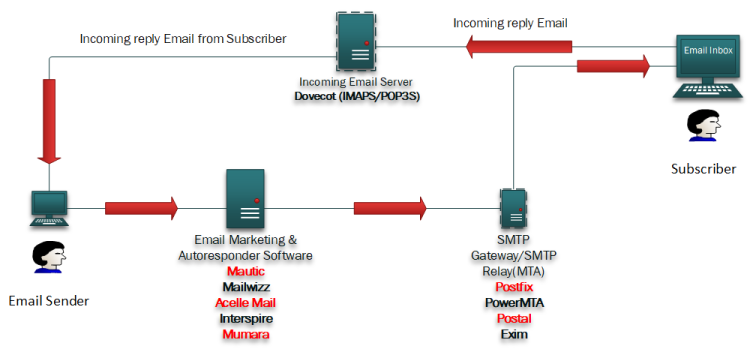
Dovecot is a free and open source IMAP and SMTP server, written in C and licensed under the GNU LGPL. Dovecot provides an easy-to-use interface for a group of related tools, such as email address management, delivery status notifications, address books, mail filtering and various content filters. This allows you to easily manage your mailboxes using only one place. Dovecot has been designed to be easy to install, manage and scale-out:
✅ Roundcube webmail Installation
✅ Postfix and Dovecot & Mariadb vHost Installation
✅ 1 IP & 1 Domain Setup With Virtual Host
✅ Setup Multi Domain Control Panel
✅ Webmail for Email Reply & Forwarding
✅ SSL certificate Installation (Paid SSL | Free SSL )
✅ SPF Setup similar with Existing Configuration.
✅ DKIM Setup similar with Existing Configuration.
✅ DMARC Setup similar with Existing Configuration.
✅ rDNS Setup.
✅ Spam Filter setup if Requirements!.
✅ Firewall and Fail2ban Configuration (ssh)
✅ Report 10/10 score on mail-tester.com (IP & Domain No Blacklist )


For businesses, we offer Dovecot Email Server Installation, which is simple and requires little technical knowledge, and means you can forget about all the complexities that surround installation and configuration. There are no commands to type in and there’s no fuss over configuring the software to your requirements. Instead, our experts are going to assist you to ensure that everything works perfectly. Whether it is a software installation requirement for a small business or a company with thousands of users our service is precisely designed to meet your needs. Get started now and easy configurate Dovecot into your Ubuntu system.
Key Takeaways:
How to Choose the Best Email Server For Your Needs: Dovecot Dovecot is one of the most recommended and reliable open source email servers with a number if features. Such features makes Dovecot a popular choice for both small and large scale businesses around the world. If you are a company with lower user volume or even a company with greater volume of employees Dovecot is stable enough to work for all of them without any issues. Here’s why we think Dovecot is the most recommended email server.
You have made an excellent decision by selecting Dovecot as your email server since it is robust, trustworthy, secure, and can grow in accordance with your organization's email requirements. Make the most out of Dovecot and enhance the performance of your email server.
Dovecot is a free, open-source emails server which is recognized by a majority of its users to be one of the most reliable, and highest performing, email servers with enhanced security features making it even better. It has many features that suit organizations of different sizes and we shall look into them below.
Features
Reliability and Performance : Dovecot is primarily designed to improve connections per second (CPSs) and connections per mile (CPMSs) while still overcoming the sending email blocks. According to some internet reads, it has an 'optimum performance package' as its code base and statistical algorithms are said to maximize email services usage and effectiveness.
Security Features of Dovecot: For obvious reasons, we should not have to explain why the security of sensitive information during exchange through an email depends on other substitute factors. This is one area where Dovecot excels as it has advanced methods for safeguarding information and restricting intruder access.
One of the Dovecot helps safeguard any single piece of information from unwanted threats is by providing SSL/TLS encryption. • Another way Dovecot provides a robust email authentication experience is by allowing LDAP and MySQL integration.
To provide controlled servers access controls, Dovecot requires the admin to provide a list of IP addresses that would be allowed to access the server.
Sievec-based mail filtering: Filters and blocks unwanted mail to guarantee the desk is free from any unnecessary stuff.
Dovecot Install Service: What is in it
The people working for us will take care of every step involved in the installation process. All that you will be required to do is getting in touch with us. We provide comprehensive solutions including the following:
Getting any of the services from us ie Dovecot install service means top notch quality and immediate results as we are thorough professionals when it comes to working and helping you run an email server smoothly while getting rid of the troubles that arise due to setting one. Step by Step Installation Procedures in Detail Dovecot on Ubuntu
Installing Dovecot on your Ubuntu system can be intimidating, especially if you’re not familiar with the installation process. Don't panic, our informative and easy to follow guide will cover most of your queries related to how to install Dovecot on Ubuntu. The guide would cover the following topics.
Once these processes are followed, you should be able to install Dovecot on Ubuntu without any hitches. However, if you are in any way troubled during this process, you can communicate with our support team for assistance.
Altering your Dovecot configuration will permit you to customize the email server according to your needs. There are many parameters that can be changed like the way in which mailboxes are created and users are added along with other methods of authentication which can help enhance the performance of the Dovecot that you installed.
To customize your Dovecot configuration, the very first step is configuring mailboxes and users. This specifies how information is organized within the mail storage, for instance whether emails are arranged in a hierarchical manner by creating folders, establishing mailbox limits, and setting user’s right to use the mailbox. Tailoring it helps in managing their emails efficiently and enhances their usage.
To enhance the performance of your Dovecot deployment, it is necessary to tweak your Dovecot configuration to what is relevant for your environment. Performance tuning includes tuning settings like maximum number of connections accepted at a time, the buffer size of storage, caching mechanisms, and timeouts. It helps to fine-tune these parameters and gain Dovecot's email traffic-matching capability, prompt faster responses, and make cost SAAS less server resources.
Dovecot email server protects the organization’s information and sensitive data under its supervision and control from unwanted access, therefore, investing time in securing Dovecot email server is essential. Here are some best practices to ensure the security of your Dovecot email server:
All these strategies together will assist bolster the security of your Dovecot email server and in addition protect your organization’s email communication systems.
While Dovecot email server systems are useful on their own, they can also work well with other email systems and create a streamlined email management system suitable for any organization. It makes perfect sense to integrate Dovecot with other email systems since it will increase both the security and usability of the entire email system.
Providing Dovecot's MTAs integration is one option for extending use of the Dovecot email server, for instance with Postfix or Exim. MTAs are responsible for routing emails in the exchange process between several mail servers. So, in case you are using a Dovecot email server, it's better to combine it with an MTA of your liking in order to guarantee smooth communication in the organization.
Possible spam and malicious threats are one of the main reasons that spams emails are banned from practicing. To block out spam messages, for instance, you can combine Dovecot with SpamAssassin or ClamAV which are popular spam filtering and antivirus software solutions. Such software can prevent spam messages from being sent and allows being free viruses or unwanted attachments giving a better email experience.
Data privacy and protection of users are the key focus of organizations that deal with sensitive information. Dovecot implements a variety of security measures including Transport Layer Security (TLS) and Secure Sockets Layer (SSL) which protects the confidentiality of your users during the email transmission. Integrating Dovecot with such encryption technologies allows the user to ensure that such information is secure and only accessible to authorized users.
Connecting Dovecot with other email services allows the best features of every component to be used thus promoting a comprehensive and effective approach to managing emails. Connect MTAs, add spam filters and antivirus tools, strengthen encryption and protection of user’s data – all that Dovecot can do without any friction and with integrations tailored specifically to your organization’s requirements.
now that your Dovecot email server has been installed, it is crucial to be aware of the various aspects important for its management and maintenance. This ensures that the Dovecot server runs smoothly without any hindrances. These practices include but are not limited to;
Adhering to these guidelines will enable you to properly maintain both the Dovecot email server and email communication throughout your company.
Just like any software, Dovecot could face common problems where it would perform below expectation, or run with several bugs. Some of the possible problems you can come across with Dovecot include and a few troubleshooting options include:
Not Able To Authenticate: In case if you are not able to authenticate while trying to get in to an email server, keep the following in mind
Launch your dedicated high-deliverability email infrastructure with our senior email architects today.