
Nginx & Event MPM Tuning
Worker connections, keepalive pools, epoll event loops, and buffer sizes calibrated for heavy visitor loads.


Install an FTP server on Linux and Ubuntu with this comprehensive guide. Get expert assistance for configure FTP server installation service.
Optimized Web Server Technologies & Accelerators
Full-Stack Performance
Eliminate server bottlenecks, optimize database query execution, and cache assets close to your visitors.
Worker connections, keepalive pools, epoll event loops, and buffer sizes calibrated for heavy visitor loads.

Dynamic innodb_buffer_pool sizing, query cache retirement, thread concurrency limits, and slow query profiling.

Zero-RTT session resumption, OCSP stapling, and modern TLS cipher suites for instant SSL handshakes.

In-memory key-value caching offloads up to 90% of dynamic database queries for sub-second page rendering.

High-ratio byte stream compression reduces text payload transfer size by up to 80% without CPU spikes.

On-demand worker spawning prevents 502/504 gateway timeouts during sudden viral traffic surges.
Low TTFB and fast LCP directly increase organic Google search rankings and customer engagement.

Squeeze 3x more traffic capacity out of your existing hardware before needing to upgrade server sizes.

Say goodbye to 502 Bad Gateway and 504 Gateway Timeout errors during marketing sales campaigns.
Starting at
single service
Order Quick AuditStarting at
full server tune
Start OverhaulStarting at
per month / server
Subscribe GuardianSide-By-Side
| Feature | HostsCheap | Default Stock Server Config | WordPress Caching Plugins |
|---|---|---|---|
| Average Dynamic Page TTFB | 35ms - 75ms | 450ms - 1200ms | 200ms - 400ms |
| MySQL InnoDB Buffer Allocation | 70% Memory Tuned | 128MB Default | N/A (No DB tune) |
| HTTP/3 QUIC Protocol | |||
| PHP OPcache JIT Enabled | |||
| Handles Viral Concurrency Spikes | 10,000+ Req/sec | Crashes ~300 Req | Plugin Overhead |
| Before & After Benchmark Report |
Optimization done right never compromises security. Every tuning profile retains rigorous isolation controls.
Customer Stories
“Our WooCommerce catalog used to take 2.4 seconds to load product filters. After their MySQL and Redis overhaul, it takes 180ms. Sales jumped 22%.”
“We were getting 502 bad gateway errors every time an email newsletter went out. HostsCheap tuned our PHP-FPM pools and the server didn’t even flinch.”
“Before hiring them, we were about to spend $400/mo on a dedicated server upgrade. Their $89 tuning made our existing $40 VPS run like lightning.”
Get the perfect FTP server setup for your business with our expert installation and configuration services. Let us help you get started today! Discover how to install an FTP server on Linux, specifically Ubuntu, with our comprehensive step-by-step tutorial. Learn how to set up an FTP server installation service efficiently.
$100.00 USD One Time Setup Fee
GigID : LSS-DNSSIS-802 Delivery 04 Days
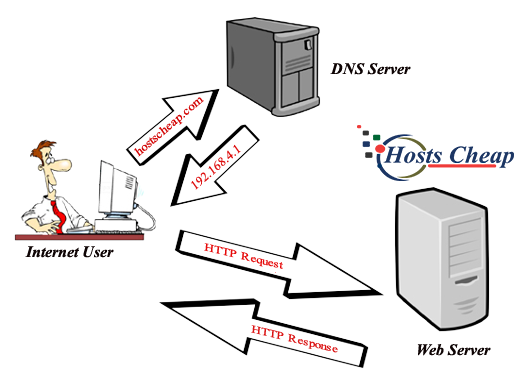
The Domain Name System or DNS server is a system that enables the automatic translation of hostnames (like example.com) to their corresponding Internet Protocol or IP addresses. The hostname is the name given to an IP address, domain and domain name are used interchangeably in this article. The DNS server contains a database of public IP addresses and their corresponding domain names, which is useful to search for websites by their registered name and not just by their literal IP address.
✅ DNS Server Installation (LAN / Internet)
✅ 1 Domain Setup
✅ GUI Domain Management
$100.00 USD One Time Setup Fee
GigID : LSS-FTPSIS-803 Delivery 03 Days
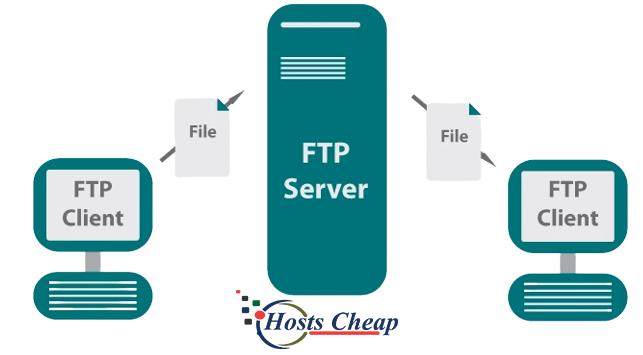
The File Transfer Protocol is a standard communication protocol used for the transfer of computer files from a server to a client on a computer network. FTP is built on a client–server model architecture using separate control and data connections between the client and the server. FTP is typically run on top of SSL encryption to ensure security between your server and client. The File Transfer Protocol (FTP) is a communication protocol used for the transfer of computer files from a server to a client on a computer network. FTP is built on a client–server model, using separate control and data connections between the client and server.
✅ FTP Server Installation (LAN / Internet)
✅ 1 Domain Setup
✅ User Authentication
This article talks about FTP installation services that people seeking provisions to install FTP servers should find useful. The importance of FTP installation for a busy organization’s transfer of files securely is overwhelming. Hence, allow us to show our FTP server installation service which offers fast and dependable installation support to have your server online immediately.
Regardless of whether you require an FTP server for maintaining a website, sharing files, or backing up data, our service will meet your requirements. We appreciate how in the modern business world, secure file transfer, data centralized storage and remote access functionalities are vital yet challenging to address. Our FTP server installation service has you covered as far as your file transfer needs are concerned, rest easy.
Key Takeaways:
With our assistance, you can have control over your time and resources through our effective management of your FTP server configuration and deployment.
Let us now start with how the FTP servers work along with the towers of their installation process. What’s more, we will also try to view what FTP servers are, what can be the advantages of using it and where it can be employed.
File transfer protocol server or computer program that helps in sending files across multiple devices over a network is termed as FTP (File Transfer Protocol) server. It serves as a base to retrieve files or data that need to be shared among the users in a form of a hub.
An FTP hosted server can be beneficial for both an organization as well as an individual in many ways including:
FTP servers have a wide range of uses in numerous industries and provide assistance in;
When it comes to putting up your FTP server for the first time, there is no shortage of professional installation services and they surely have their benefits. For a start, professionals come with the expertise and experience necessary to ensure that the process of setting up the FTB server is done in an efficient manner saving you time and most importantly effort. In addition to that, having the server professionally installed helps you have a reliable FTP server setup which is very important especially when multiple files have to be transferred as it provides stability and safety for such dealings.
Expertise and experience: FTP server installations are not that easy and some professionals can help as they have ample knowledge pertaining to such topics and they can understand all the technicalities involved.
Now the last part is to pick the right software for the FTP server. It should enable you to successfully and reliably transfer files through the server. It is rather inconvenient to choose a server software there are many out there but it is worth it for your organization to compare top FTP server software and understand the distinction of open source and proprietary solutions.
Choosing either open source or proprietary solutions while evaluating the FTP server software is commonplace. Some things to note:
Open Source – An open source FTP server software doesn’t cost the organization any money and enables modification by users. It usually derives from a community-based development model and receives updates and rebuilding of bugs at a constant. Open source solutions can be quite attractive to organizations with less cost.
Proprietary: A Proprietary FTP server software is developed and used by a certain company. It might have custom options, support, and security. Often these can have client support and may be appropriate for institutions that focus on the usage of additional features and need extensive technical support because they could be managed by professional customer services.
On the other hand, determining which type of FTP server is right for you will come down to open-source FTP Servers and proprietary FTP Servers based on your requirements, budget and level of ability and knowledge about the software.
For planning out the costs involved in the process of setting up your FTP server, you should take care of the following initial configuration requirements as they are crucial:
Discuss and implement the server architecture that is best suited for your purpose. FTP server software must be installed on a server, FileZilla Server, ProFTPD, and Pure-FTPd to name a few. Use the one on the server that is best suited to your goals and objectives along with the installation instructions.
Create static IP addresses and configuration port forwarding rules on the router to allow the server to be accessed by using FTP in the future along with this make sure to generate the network parameters for the FTP server.
Set up and enable FTP traffic first by opening all relevant ports these are most likely to be port 21 for FTP control and ports 1024-65535 which are used for passive FTP data connection passive mode.
S3 FTP is believed to be the answer to the future for its wide range of benefits it provides. Utilizing the effectiveness of cloud storage expands the opportunities that businesses have regarding their FTP activities. With the adoption of S3 FTP solutions, businesses don’t have to worry too much about the amount of free space that is left because storage is practically, boundless. Furthermore, there’s S3’s structure that’s maintained which guarantees, high levels of uptime, hence the FTP server works seamlessly 24 hours a day.
Setting up such S3 FTP File Backup/Transfer Solutions is not that complicated. It is a clear cut process. Here’s a mini-guide.
Consider the following steps to implement FTP S3 backup/transfer file system, which is very archetypal due to the fact that it is cloud based. This will greatly improve an FTP server’s features as it will allow for easy sharing of information, easy retrieval of information and added features for information protection.
First, try to envisage the financial and other deployment challenges one may encounter when trying to successfully deploy an FTP server. Keeping these factors in mind when developing the ftp server, one is able to plan and allocate funds appropriately in order to meet the parameters for ftp server deployment. One of the most challenging tasks that you will face is finding a value for money ftp server that is also tailored to your specific needs.
Factors that determine the planning for deployment of an ftp server are not just the financial implications. Pay close attention to the following factors that are needed for a successful deployment:
When choosing an FTP server solution for your company ensure you consider both these aspects and control the amount of money required for the installation. The result would be a safe as well as a competent and dependable platform for smooth file transfer.
To improve and sustain the service and provide optimum functionality and dependability of FTP server systems, certain measures must be put in place to enhance speed. Altering the configuration of the server and following its performance allows you to conduct fast and secure files transferring operations within your company.
It is possible to boost the speed of the response times by simply fine tuning certain features of the FTP server. The following are some of the features that can be adjusted:
These features can be modified so that time taken to execute responses on the FTP server is lowered. While more time is gained in transfers of files, the performance of the user increases as well.
For any component, any network or computer service that is functioning optimally, has to be maintained and monitored effectively. This is especially true for your FTP service as well. Here are a number of suggestions to bear in mind.
Maintaining your FTP service continuously and monitoring its progress on a day-to-day basis allows you to obviate or circumvent any performance difficulties from simmering and emerging to affect the smooth functionality and operation of the company in any way. Regular updates, log monitoring, and performance testing will ensure that your FTP server is always dependable and operational. Our FTP server install service ensures that.
FTP server security is a critical aspect of protecting your data and conforming to the dictates of data protection laws. In this text, we will be focusing on two things: securing the data transfer, and addressing some elements concerning Copyright and Database protection.
In regard to your FTP server security, one of the most important safeguard measures would be the adoption of secure transfer protocols including FTPS and SFTP. These protocols guarantee the protection of your data as well as block access and listening to any transmission during the whole process.
By implementing FTPS and/or SFTP for your FTP server, you’re adding an additional layer of security to your file transfers, thus ensuring that there is minimal risk to loss of data or unauthorized access.
The turnover of a business that deals in sensitive data is mindful of the fact that they have to be compliant with certain data protection regulations. Depending on your business model as well as the region you are operating in,
Book a tuning session with our performance engineers today and watch your page load times drop.