
Nginx & Event MPM Tuning
Worker connections, keepalive pools, epoll event loops, and buffer sizes calibrated for heavy visitor loads.


Securely set up Nginx server with SSL certificate installation for proper updating of your server's certificate.
Optimized Web Server Technologies & Accelerators
Full-Stack Performance
Eliminate server bottlenecks, optimize database query execution, and cache assets close to your visitors.
Worker connections, keepalive pools, epoll event loops, and buffer sizes calibrated for heavy visitor loads.

Dynamic innodb_buffer_pool sizing, query cache retirement, thread concurrency limits, and slow query profiling.

Zero-RTT session resumption, OCSP stapling, and modern TLS cipher suites for instant SSL handshakes.

In-memory key-value caching offloads up to 90% of dynamic database queries for sub-second page rendering.

High-ratio byte stream compression reduces text payload transfer size by up to 80% without CPU spikes.

On-demand worker spawning prevents 502/504 gateway timeouts during sudden viral traffic surges.
Low TTFB and fast LCP directly increase organic Google search rankings and customer engagement.

Squeeze 3x more traffic capacity out of your existing hardware before needing to upgrade server sizes.

Say goodbye to 502 Bad Gateway and 504 Gateway Timeout errors during marketing sales campaigns.
Starting at
single service
Order Quick AuditStarting at
full server tune
Start OverhaulStarting at
per month / server
Subscribe GuardianSide-By-Side
| Feature | HostsCheap | Default Stock Server Config | WordPress Caching Plugins |
|---|---|---|---|
| Average Dynamic Page TTFB | 35ms - 75ms | 450ms - 1200ms | 200ms - 400ms |
| MySQL InnoDB Buffer Allocation | 70% Memory Tuned | 128MB Default | N/A (No DB tune) |
| HTTP/3 QUIC Protocol | |||
| PHP OPcache JIT Enabled | |||
| Handles Viral Concurrency Spikes | 10,000+ Req/sec | Crashes ~300 Req | Plugin Overhead |
| Before & After Benchmark Report |
Optimization done right never compromises security. Every tuning profile retains rigorous isolation controls.
Customer Stories
“Our WooCommerce catalog used to take 2.4 seconds to load product filters. After their MySQL and Redis overhaul, it takes 180ms. Sales jumped 22%.”
“We were getting 502 bad gateway errors every time an email newsletter went out. HostsCheap tuned our PHP-FPM pools and the server didn’t even flinch.”
“Before hiring them, we were about to spend $400/mo on a dedicated server upgrade. Their $89 tuning made our existing $40 VPS run like lightning.”
Experience a secure, encrypted connection with our NGINX SSL certificate install service, enhancing visitor trust and site credibility. To properly install SSL in Nginx server, set up Nginx Let's Encrypt service for updating server certificate, and ensure Nginx SSL cert setup is correctly established.
$80.00 USD One Time Setup Fee
GigID : LSS-SSLI-804 Delivery 03 Days
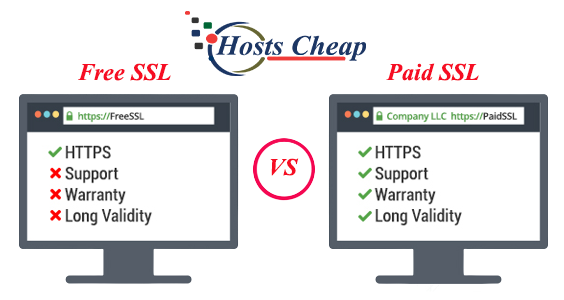
Paid ssl installation service is provided by hostscheap. Which allows to experts to do the task for you. It also has the ability to track your ssl certificate details via its live support.
Install SSL Certificates:
✅HTTP to HTTPS redirection.
✅Fix green padlock issues
✅Full Strict Mode (High-Level Security)
Supported SSL Certificates:
✅Domain Validation (DV)
✅Wildcard
✅Multi-Domain
✅Let's Encrypt/Comodo
Services Provide To :
✅Dedicated/VPS linux Servers.
✅Control Panels: cPanel, Plesk, Centos-control panel,
✅Web Servers: Apache, Nginx, LAMP,
✅Magento ,WordPress / E-commerce,
$80.00 USD One Time Setup Fee
GigID : LSS-SSLI-804 Delivery 03 Days
As an entrepreneur, you should take free SSL certificates installation from hostcheap as your first benefit that would reduce your efforts to improve your business success. These days, security matters a lot and that is why you have to put your trust in SSL certificates for running a successful online business. The best thing with hostcheap Free SSL Certificates Installation Service is that comes with lifetime warranty without any additional cost. With up to 99.9% trusted by browsers, free SSL certificates improve the trust and safety of visiting websites by providing encryption technologies. What else do you expect from hostcheap?
Install SSL Certificates:
✅HTTP to HTTPS redirection.
✅Fix green padlock issues
✅Full Strict Mode (High-Level Security)
✅Permanent SSL Certificate (Lifetime expiry)
Supported SSL Certificates:
✅Domain Validation (DV)
✅Wildcard
✅Multi-Domain
✅Let's Encrypt/Comodo
Services Provide To :
✅Dedicated/VPS linux Servers.
✅Control Panels: cPanel, Plesk, Centos-control panel,
✅Web Servers: Apache, Nginx, LAMP,
✅Magento ,WordPress / E-commerce,
$80.00 USD One Time Setup Fee
GigID : LSS-SSLI-804 Delivery 20 Days
As for those who attract and keep their clients with a personal touch, they cannot afford to ignore the importance of SSL certificates in e-commerce business. Keeping your clients safe and secure at all times is essential. And SSL provided by Hostcheap plays an essential role here. Because of its trusted origin, your visitors will surely stay on your website longer which is going to cut any distractions and increase actions that relate to sales.
Install SSL Certificates:
✅HTTP to HTTPS redirection.
✅Fix green padlock issues
✅Full Strict Mode (High-Level Security)
Supported SSL Certificates:
✅Domain Validation (OV & EV)
✅Wildcard
✅Multi-Domain
✅Let's Encrypt/Comodo
Services Provide To :
✅Dedicated/VPS linux Servers.
✅Control Panels: cPanel, Plesk, Centos-control panel,
✅Web Servers: Apache, Nginx, LAMP,
✅Magento ,WordPress / E-commerce,
Are you worried about your website’s vulnerability? In this current age, it is highly essential to secure your website from any attack. One way to ensure the security of your website is the installation of SSL certificates and as for this, we have our NGINX SSL certificate install service ready to assist you.
As part of our case, we offer an order installing nginx ssl certificate which makes the whole process fast and effortless assuring your site security. When a valid SSL certificate is implemented, it holds all communications between an NGINX server and its visitors' computer in a secured format which protects sensitive data and establishes user’s confidence.
There are many advantages that arise when a site is secured by SSL certificates. First, it adds an extra layer of security to your site by preventing any leaks during the data transfer which means it is almost impossible for any hacker to be able to gain access to the confidential information that is exchanged between your server and the users. This protection is especially important for websites that take in sensitive information such as credit cards or ID details.
Second, an SSL certificate enhances your credibility online. Users often reach out to the search bar and look for a padlock sign or an “https” before making any purchases. Such small acts of caution increase the trust of an individual in the brand itself, meaning the users will engage with the brand more often along with higher conversion rates and retention.
Last but not least, an SSL certificate can help strengthen your search engine optimization. Google and other search engines see SSL as a ranking signal and therefore certificates sites with an SSL may end up with a little better placement on the search engines which gives them an advantage.
With NGINX servers at [Your Company Name] that are performance oriented, scalable, and easy to set up. The NGINX SSL Certificate Install Service takes care of the NGINX server setup and SSL integration. Hence you can concentrate solely on managing the website.
Never compromise your website’s security and credibility. Our nginx ssl certificate install service will secure your website so that you can focus on gaining the trust of your customers, safeguarding sensitive data and enhancing your search engine authority.
With the emphasis on the online world in this era, website security has become crucial. One of the excellent means of averting website attacks, and upkeeping users sensitive information, is the usage of SSL (Secure Sockets Layer) on your NGINX Server. So, let us now take a step back and understand the importance of SSL in the context of an nginx server. What are the many benefits it has to offer and how does it help you.
1. Increased Security: Data breaches are a very real and scary occurrence in the web, which is why SSL is needed on your NGINX server. The communication between your NGINX server and users’ browser will be encrypted and text cannot be easily exchanged. Tampering with communications such as log in a web session or using it for other malicious purposes becomes very hard.
2. Confidence: Having an SSL certificate incorporated into your NGINX server will make users have faith in your website. The absence of the padlock icon and the lack of the "https" protocol in the web address, also fosters fear among the target audience by establishing a lack of credibility.
3. Organic Traffic Generation: SSL certificates are essential for the proper ranking in SEO and almost all popular search engines, such as Google, secure websites. Having an SSL certificate installed on your NGINX server increases your rankings and searches done on search engines, leading to more traffic than you would normally acquire without it.
4. Client and Server Authentication: Secure Socket Layer has been accepted as a standard for protecting all websites that deal with sensitive material, so it seems wise to provide SSL support on your NGINX server to ensure compliance and best-practices of the market at all times.
5. Protection of Websites and Data from Unauthorized Access: There were more breaches and cyber penetration during recent times than ever before. By using SSL encryption the website and user data is protected. By encryption of data shared between your server and the user’s device the possibility of breach and unauthorized access of sensitive data is greatly reduced.
6. Security: Protecting your NGINX server with SSL can be viewed as an added security feature of your website and the data you deal with, this brings a sense of security. You are not required to worry about security breach, this provides you with the opportunity to concentrate on other facets of your web presence and business in general.
In short, the SSL certificate is crucial for your NGINX server. It increases security, instills confidence, improves search engine results, ensures regulation compliance, offers protection against hacking, and most importantly, offers peace of mind. Now that we recognize the importance of SSL for your NGINX server, it is time to NGINX and how it can be useful for your site.
This chapter will help us explain more fully what NGINX is and how it can assist you. NGINX is a high-performance web server, reverse proxy, and load balancer that has the potential to yield high performance, great scalability and simple configuration. From a simple blog to e-commerce websites, NGINX can ensure high acceleration for your website which increases the value of user experience.
The other uses of NGINX HTTP server: More than just a web server.
NGINX is not only useful for delivering web content. Its range is greater: it is also a very efficient reverse proxy, that is a proxy server that subverts the true address of the web server, in this case, the address of the clients, by passing requests to the necessary back-end servers.
As a reverse proxy that is well known to have many valuable features, it can help you:
- Increase the overall website performance by caching static resources and reducing backend servers workload. - Improve security by restricting unwanted requests and controlling who has access to the application. - Reduce the time spent on server upkeep since the updates can be released without disrupting the users.
Although, the possibilities of what NGINX can do do not end there. It’s also very good as a load balancer.
NGINX in the Tech Industry: Real-World Usage
NGINX has the ability to act as a load balancer which is useful because it can distribute the incoming traffic evenly to the backend servers and prevent any resource overload and stagnation. This is most useful in industries with high availability and scalability demands.
All these examples put together highlight and support the claim that NGINX is useful in many industries and in many different ways.
The Most Advanced Tutorial on CSR and Private Key Generation
In an SSL certificate request process, the in the chain of trust, the Certificate Authority (CA) submits the Certificate Signing Request which has a contribution in the end by creating a public key. As part of the process of issuing an SSL certificate, CAs are responsible for validating the organization's information stated in the CSR. This means that the SSL certificate request and issuance processes are integrated as the information in the certificate is sent to the CA along with the CSR.
Encrypted traffic received by your website is decrypted with the help of the Private Key, and this forms the core reason for keeping it safe. Private Key exposure along with its criticism can lead to degrading of your website's fortifiers and end users engagement in illegal activities. The process of generating a strong and safe Stored Private Key is extremely necessary.
Detailed Guide: Adding OpenSSL and navigating to your Command Prompt.
First, you need to run the command openssl genpkey -algorithm RSA -out private.key for creating a new private key.
Secondly, to generate a CSR, use the command ‘openssl req -new -key private.key -out csr.csr.’
Once the command is executed, the system will require details such as your organization name and domain.
Even if you ran those commands, ensure that the files containing the private key and CSR are present.
After completing these steps, proceed to applying for your SSL certificate with the incom out you provided. The CA will validate the details provided. Once they are satisfied, they will approve the request allowing you to use SSL on your server.
It is important to understand one thing, the requirements of the NGINX server vary from one to another and hence the certificates will vary too. We will go through the factors which are important in the selection of the SSL certificate.
Domain Validated (DV) : If your website is personal and trustworthy, these are the most recent and easy to get SSLs available on the market.
Organization Validated (OV) Certificates: This class of digital certificates assumes a higher level of assurance since the identity of the organization and the domain name has to be validated. They fit the profile of small to medium businesses that opt for an average level of user confidence.
Extended Validation (EV) Certificates: These categories of certificates offer the highest level of assurance since the domain, organization, as well as the legal existence of the website is rigorously confirmed. They feature the name of the corporation in the browser URL bar which entails a higher level of confidence. An EV certificate is suitable for protection of online stores or websites that require a high level of user's trust.
While choosing an SSL certificate, it is advisable to check your NGINX server’s compatibility. Most of the SSL Certificate Issuers have certificates that are acceptable on NGINX servers but it is always good to verify this with the certificate provider to avoid any problems during installation.
After identifying the kinds of SSL certificates that meet the needs of your website as well as the requirements of your NGINX server, you have managed to improve your website’s security and preparedness to earn trust from your users.
SSL Certificate Ordering Process
In this section, we will provide you with orders and configurations post-validation bestowed by your selected trustworthy provider and SSL certificate. A valid SSL certificate will help in the maintenance of secret information of users and concurrently win their confidence. Ensure that you comply with the following steps to ease the process:
Complete Payment: Process the payment based on the payment methods mentioned. Do ensure that you enable a payment that guarantees the safety of your financial information.
Once you place the order for your SSL certificate, the certification agency begins verification. This process goes a long way in assuring your clients a meaningful domain by verifying your domain and organization details. Varied levels of validation are required for SSL certificates:
Once the validation is thorough, you will be emailed your SSL certificate. Making sure that guidelines of installation and configuration that are offered by your trusted vendor are adhered to Boosting Nginx Properly.`
Completing the troubleshooting and verification of an SSL requires some preparation, firstly verification of the prerequisites of the NGINX server and configuration settings of the NGINX server. Following steps should be completed for successful installation of NGINX SSL:
Install NGINX: Ensure that you have the NGINX installed in your server, in the non-availability of NGINX installation you can find the relevant installation guide and downloads from NGINX official website. Acquire dedicated IP: Dedicated IP is necessary to activate SSL on your NGINX server, reach out to your server vendor so you are sure that a dedicated IP address is available to your server before proceeding.
Making sure you have the Right Directories: Install SSL SSL for instancing uses standard underlying architecture that has to direct specific files and folders. A very good and convenient practice is creating the directories where you will be putting your certificate, private key, and any key related files. These folders will conventionally be kept anywhere within the /etc/nginx/ssl/ or /etc/nginx/conf.d/ssl/ folders.
Getting an SSL Certificate: If you have not been able to get the SSL certificate for yourself you need to first raise a
Book a tuning session with our performance engineers today and watch your page load times drop.