
Clean OS & Panel Deploy
Optimized installation on AlmaLinux, Ubuntu, or Debian with recommended production partition layouts.


Looking for a reliable Plesk install service to set up your mail server? Consider using Plesk Almalix for all your installation needs.
Supported Control Panel Ecosystems & Addons
Enterprise Server Management
Our certified Linux engineers handle OS hardening, web server tuning, firewall rules, and zero-downtime transfers.
Optimized installation on AlmaLinux, Ubuntu, or Debian with recommended production partition layouts.

CSF firewall, ModSecurity OWASP rules, and brute-force protection configured out of the box.

LiteSpeed or Nginx reverse proxy with OPcache, Redis caching, and PHP-FPM worker pool optimization.

MySQL/MariaDB buffer tuning, slow query logging, and InnoDB optimization for responsive dynamic websites.

Full SPF, DKIM, DMARC, and PTR record validation to guarantee high inbox deliverability.

Seamless transfers of accounts, databases, emails, and DNS with comprehensive pre-switch data audits.
Free your developers from routine package updates, kernel patches, and user account troubleshooting.
Fine-tuned daemons prevent memory leaks, load spikes, and resource starvation on high-traffic servers.

Real-time intrusion detection and automated vulnerability patching neutralize exploits instantly.
Starting at
one-time fix
Order Incident FixStarting at
one-time setup
Start SetupStarting at
per server / month
Subscribe Pro CareSide-By-Side
| Feature | HostsCheap | Unmanaged VPS / DIY | Generic Outsourced Support |
|---|---|---|---|
| Response SLA | < 15 Minutes | None (DIY) | 4-8 Hours |
| Root Security Hardening Included | +$50 Extra | ||
| Database & Webserver Tuning | Manual | ||
| Zero-Downtime Migration Support | +$100 Extra | ||
| Proactive Health Monitoring | Basic Ping Only | ||
| Money-Back Guarantee | 14 Days | None | None |
Every panel configuration includes our hardened security baseline to safeguard critical data against modern threat vectors.
Customer Stories
“Migrated 45 customer accounts to a new high-spec server overnight without dropping a single email or customer session. Flawless execution.”
“Our server was constantly hit by brute force attacks. Their security team hardened CSF and configured fail2ban within 45 minutes.”
“Subscribing to Monthly Pro Care was the best decision for our agency. Tier-3 sysadmins on call whenever we need them.”
Streamline your web hosting with our Plesk install service quick, efficient and tailored to optimize your server. Web Hosting Panel installation guide. Get expert Plesk install services for a seamless setup of your Almalix mail server. Our service includes Plesk installation and mail server configuration.
$200.00 USD One Time Setup Fee
GigID : CPS-PIS-417 Delivery 04 Days
Plesk is a web hosting platform with a control panel that allows the administrator to set up websites, reseller accounts, e-mail accounts, DNS, and databases through a web browser). Plesk integrated support for Content Management Systems (CMS), which includes but is not limited to WordPress, Joomla, and Drupal. Now your website and blog can be customized even further than ever with these helpful plug-ins.
✅ Domain Setup upto 3 Domain
✅ Configure Multiple php version
✅ Improvements Security System
✅ Install Free SSL Addon
✅ SSL certificate Installation
✅ SPF Setup similar with Existing Configuration.
✅ DKIM Setup similar with Existing Configuration.
✅ DMARC Setup similar with Existing Configuration.
✅ rDNS Setup.
✅ Spam Filter setup of Requirements!.
The installation of Plesk on your server can be very simple and straightforward.it is essential for any server management. With our Plesk Install Service, everything you need for the Installation is a click away and you can ensure that your server possesses the strong web management software. In this article we will focus on how to install Plesk on your server in an easy and simple way starting from system requirements to configuration.
Key Takeaways:
Plesk is a Great and Inclusive server and website management tool that allows server administrators to manage their servers and hosting with utmost ease.Several Plesk features include configuration and server monitoring, which makes server management quite simple.
Plesk has a number of benefits when it comes to server management thus making it the most preferable. Here are some things to think about why you should prefer Plesk when it comes to web management:
It is Quite Simple to Use: Plesk has been designed in such a way that even a person with no technical skills is able to use it effectively. With its intuitive and easy to understand interface, managing websites along with domain and email set up becomes simple.
It Tends to Cover All Aspects: Plesk enables you to take care of all your server management routine through its vast and comprehensive range of tools and feature set that add unlimited versatility. It is possible to use Plesk for website and application management, database management, and even email services.
Third Party Applications and Integration Tools: Through Plesk’s extensions marketplace you will find various add-ons that will serve the purpose of enhancing your server’s functionality and customization options. Now you can easily add performance boosters, security enhancements and even extra applications with the help of extensions.
Data And Server Security: With Plesk, server and data protection is guaranteed as the program is designed while keeping these features in mind. Regular patches and updates then aid in keeping the server both stable and secure.
For the Plesk installation to go on smoothly, there are some crucial requirements that the server should meet. They include the following:
For seamless integration, we will provide you with a detailed list of the specific system requirements. Thus, as long as your server meets these requirements, you will be able to install Plesk with no issues.
In other situations, appropriate attention is not devoted to server’s configuration prior to Plesk installation that could lead to server related issues. This includes:
To guarantee that your server is correctly configured and that device installation could proceed with minimal hiccups, authoritative instructions will also be made available for all steps.
A prerequisite to applying Plesk on your server is downloading and running the Plesk Installer. This particular utility streamlines the installation process making it easy and effective. This part will inform you about locating a specific Plesk version and utilizing the Plesk Web Installer.
There are those users who seek for a paticular Plesk version that best suits their requirements. In the same breath Plesk also has a range of its users who may prefer any other version that is different and far from their current use. With this guide we will help you choose the optimum Plesk version suitable for your server environment. And by keeping the applicable version of Plesk you also have the chances for greater and better features.
In order to make the whole of the installation process easier, the Plesk Web Installer allows those that are confused with the steps to follow a guided interface. To obtain this interface, you first will be encouraged to download the Plesk Web from the official Plesk site of the company. After that can be proceeded with tapping the downloaded package, and then follow what is shown on the screen.
Plesk Web Installer will assist you in the necessary procedures, which include: accepting end user license agreement, choosing the components that are necessary for the installation and setting up selected components. The installation can be adjusted according to your needs by clicking the further prompts.
When using the Plesk Web Installer, the process of installing Plesk becomes significantly easier as it allows you to skip the step of downloading Plesk and starting it right away. Therefore, whether you are a novice or have used the application before, it has made the installation work easier for everyone.
There are lots of advantages when it comes to our Plesk Install Service which is useful for server management. With our service, you do not have to worry about the time and efforts that goes into the installation processes, al you have to do is seat back and relax and let our professionals do what they do best. We will take the responsibility of ensuring that Plask has been properly installed over your server and hence you would be free to concentrate on what matters the most- your business.
You might be wondering what else do you get in return for our Plesk Install Service? Well, here are a few of the benefits.
Expertise installation, In our team we have professionals who have experience in installing various versions. All you have to do is give the requirements to suit your server and they will do the installation correctly.
Time saving, With every business, time is quite important and our service aids in that. You will hardly have to spend time during the installation process, which you can then spend on more FAQs.
With our Plesk Install Service, the following advantages can be availed so that you get Plesk successfully and with the maximum efficiency on your server.
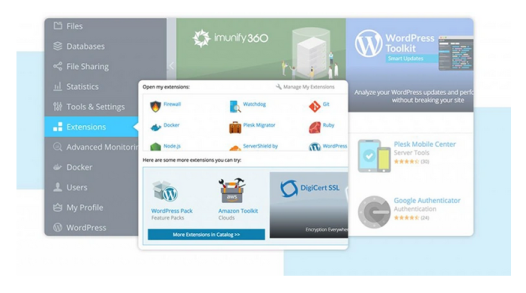
Add-ons or extensions that are available in the Plesk’s extensions marketplace can improve the features and customization of the server. The marketplace offers extensions to integrate third parties, enhance performance, and improve security among other things.
The extensions marketplace provided by Plesk can allow you to custom your server to fit your needs in a variety of ways. With these kinds of servers, you can always expect great additional features and functionalities that can make server management experience a lot better. Security enhancements, performance boosters, and many more are available in the extensions marketplace.
Once you are on the extensions marketplace, you will have a plethora of options to choose from. Let's assume you want to boost your server performance, tighten security, or add extensions to your server – you can easily go through the categories and get the one that you are looking for.
Thus by adding certain extensions to your Plesk installation, you can add new features to your server and increase its efficiency. If you are a developer, an administrator or a hosting provider, the extensions marketplace has a wide variety of options for you to improve your Plesk.
When it comes to adding extensions from the marketplace, the process is quite simple. After you find the desired extension, installing it will take only a couple of clicks. Whether you are a novice or a professional, the Plesk interface is so user-friendly that it allows fast and easy navigation to install extensions.
If you want to take your server to new heights, make sure to explore Plesk's extensions marketplace. Browse through different options available and see which extensions would be suitable for your needs. With the help of Plesk's large marketplace, you can customize your server as per your needs and get the best out of it.
The selection of an appropriate Plesk install service provider is of essential importance.
Having a Plesk installation provider service for your server is a critical aspect, the correct choice will enhance the chances of successful installation and productivity of your server. To ease decision making consider the following:
Consider the following when choosing Plesk install service providers; reliability and expertise. It is important to check how successful they have been in providing these services while reading customer feedback. Bear in mind their skills and past experience concerning Plesk installation. It is imperative as you do not want to risk giving the tasks to someone who lacks relevant expertise and skill.
Also consider their support capabilities as well. A good service provider should give after sale services including general assistance. This includes responding in time to the insurance and solving the problems timely when they arise during the installation. The customer support also plays an important role because one will need follow up after the successful Plesk installation.
Professional installation of Plesk is done by many professionals. With the accomplishment of one calling or emailing, a high-level Plesk installation service is offered. On the other hand, minimal disruptions should be expected throughout the installation period. In order to avoid any unforeseen glitches, the professionals are well educated when the Plesk installation is performed.
Another reason why an individual could opt for Professional install service providers enables you to receive constant support throughout. Constant help aids you in addressing any queries regarding Plesk post the product has been installed. At the end of the day, they are the professionals and would ensure that you fully understand the server and its potential.
The core reason of how choosing an installation service provider helps Plesk users is that they receive complete assistance from professional Plesk installers who understand how every tiny aspect works. High timely delivery, along with quality and a number of other issues or concerns that most people have with Plesk never get resolved quickly, but instead left unattended till the time they create an issue.
Let’s be honest, setting up Plesk has never been fun. But the good news is that with the introduction of a single click installation feature, deploying it on your network or server is now much easier as compared to before.
Upon successful completion of the installation, the use of the Plesk command interface becomes possible, allowing for the creation and administration of websites and related resources and web hosting services. Within a few moments, domain names can be managed, email accounts created, SSL certificates installed, and so on. However, the simplicity of the interface does not mean a lack of server management capabilities, which includes a myriad of options suitable for new users.
Normal features of Plesk would expand the convenience and simplicity of controlling the server and on top limit the workload required to operate it. For additional efficiency in server management it is recommended to utilize Plesk.
Benefits of Plesk's One-Click Installation
Plesk has numerous ways for you to customize your installation to suit your requirements. Add-on components allow you to extend the functionalities and features of your Plesk server. If you want to incorporate third-party softwares or want to modify the performance of your server. We will help you every step of the way on how to adapt your Plesk installation to your preferences. Make the best of these Add-On Components to help your server reach its absolute maximum. To install and configure these Add-On components, do the following: Log into your Plesk panel. Go to the Extensions Tab. Look for the required add-on component. Hit the component for more information about it. Hit Install button to add the component to your Plesk installation. After installation, set the add-on component to your likings.
As a result of adding extra components to your Plesk installation, you are free to tailor the performance of your server’s architecture to suit the requirements of your websites and other applications. Utilize Plesk's numerous ecosystem of add-ons and maximize your server.
However, once Plesk is installed, it is essential that you pay attention to best practices in a way that ensures the security and usability of your server. Here we will offer a few more practical insights into how you can secure your Plesk server after its installation and also enhancing your email and domain services.
Securing Plesk Server After Setup:
To be able to secure your business information on the server and to ward off threats that Plesk server might be exposed to, it is important you implement the required security measures. These measures are:
Other than utilizing Plesk, server administration and optimizations of the clients’ distinct email and domain services could improve the efficiency of the server. For instance, the following optimizations might suit the goals of maximizing the effectiveness of the provided services in relation to the client:
Get in touch with our certified sysadmins today for a rapid assessment and instant service deployment.