
Clean OS & Panel Deploy
Optimized installation on AlmaLinux, Ubuntu, or Debian with recommended production partition layouts.


Looking for expert Plesk migration services? Our team offers hassle-free migrations from cPanel to Plesk and seamless transfers to new servers. Contact us now!
Supported Control Panel Ecosystems & Addons
Enterprise Server Management
Our certified Linux engineers handle OS hardening, web server tuning, firewall rules, and zero-downtime transfers.
Optimized installation on AlmaLinux, Ubuntu, or Debian with recommended production partition layouts.

CSF firewall, ModSecurity OWASP rules, and brute-force protection configured out of the box.

LiteSpeed or Nginx reverse proxy with OPcache, Redis caching, and PHP-FPM worker pool optimization.

MySQL/MariaDB buffer tuning, slow query logging, and InnoDB optimization for responsive dynamic websites.

Full SPF, DKIM, DMARC, and PTR record validation to guarantee high inbox deliverability.

Seamless transfers of accounts, databases, emails, and DNS with comprehensive pre-switch data audits.
Free your developers from routine package updates, kernel patches, and user account troubleshooting.
Fine-tuned daemons prevent memory leaks, load spikes, and resource starvation on high-traffic servers.

Real-time intrusion detection and automated vulnerability patching neutralize exploits instantly.
Starting at
one-time fix
Order Incident FixStarting at
one-time setup
Start SetupStarting at
per server / month
Subscribe Pro CareSide-By-Side
| Feature | HostsCheap | Unmanaged VPS / DIY | Generic Outsourced Support |
|---|---|---|---|
| Response SLA | < 15 Minutes | None (DIY) | 4-8 Hours |
| Root Security Hardening Included | +$50 Extra | ||
| Database & Webserver Tuning | Manual | ||
| Zero-Downtime Migration Support | +$100 Extra | ||
| Proactive Health Monitoring | Basic Ping Only | ||
| Money-Back Guarantee | 14 Days | None | None |
Every panel configuration includes our hardened security baseline to safeguard critical data against modern threat vectors.
Customer Stories
“Migrated 45 customer accounts to a new high-spec server overnight without dropping a single email or customer session. Flawless execution.”
“Our server was constantly hit by brute force attacks. Their security team hardened CSF and configured fail2ban within 45 minutes.”
“Subscribing to Monthly Pro Care was the best decision for our agency. Tier-3 sysadmins on call whenever we need them.”
Migrate and transfer data in Plesk Obsidian server, including subscriptions and service plans for Plesk for Linux. Plesk Migration Support Service Looking for reliable Plesk migration services to seamlessly transfer your data and settings to a new server? Our team specializes in Plesk migration from cPanel to ensure a smooth transition process.
$120.00 USD One Time Setup Fee
GigID : CPS-PIS-410 Delivery 04 Days
The Plesk control panel is designed to make setting up a website, hosting multiple domains, or e-mail services as simple as possible. The administrative interface is optimized so that the system administrators are able to manage their websites using techniques they are already familiar with from the Plesk user interface. It also provides a fully integrated environment for hosting content management systems and many more applications.
✅ Domain Setup upto 3 Domain
✅ Configure Multiple php version
✅ Improvements Security System
✅ Install Free SSL Addon
✅ SSL certificate Installation
✅ SPF Setup similar with Existing Configuration.
✅ DKIM Setup similar with Existing Configuration.
✅ DMARC Setup similar with Existing Configuration.
✅ rDNS Setup.
✅ Spam Filter setup of Requirements!.
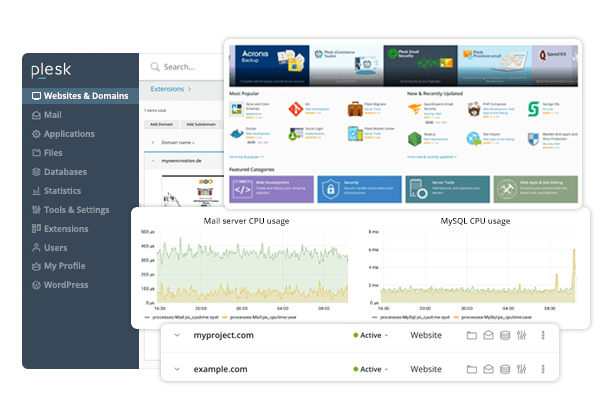
Moving your website can seem very demanding but with some tips and advice, you can leave it behind without any problems. In this write up, we will render you with some professional Plesk migration tips which will help you in relocating your site with ease. Whether it is a case of moving from a previous server or bringing together numerous resources, these tips will assist you in accomplishing the transfer efficiently with interference to your website’s services or functionalities.
Key Takeaways:
But before getting on to the migration steps, it is worth delving into the nitty gritty tasks the Plesk migration entails. Plesk is a robust server management interface that integrates many websites, domains, and applications that can be managed from a single location. Basically, when you perform a migration through Plesk, you are transferring all the components the website is made out of such as files, databases, emails, and website settings to another server. All this translates into the movement of entire installation of Plesk along with the content of websites and that which is offered by them. BriLing these essential ideas, the whole migration process will be made easier and straight forward for you.
It's time for a new server, but how do I move everything across? With this guide, you'll be able to get that new server with ease as we guide you through the entire process step by step to ensure that nothing gets lost.
Testing your servers compatibility is vital. This is especially important if you don’t regularly use Plesk in conjunction with other servers as doing so makes you more reliant in the newer server if an error arises. Things to check include looking for patches for your current Plesk version as well as the installation on the source server. If everything is compatible and up to date, you won’t face any issues migrating your data over.
When migrating over data to a new server, it is important to remember that fulfilling the data involved carrying over all the website files, databases, email accounts and any custom modifications. That is precisely the reason why creating a checklist comes in handy. Whenever you use the checklist and remember to cross it after you're done with the data migration it ensures that you won’t miss anything important.
To lessen the chances of losing data or encountering any issues, it is best to prepare the source server before the migration. Also, make sure that the version in which Plesk was installed corresponds with the system specifications. Resources that require migration need to be adequately checked. Proper preparation leads a smoother and a more streamlined moving experience.
It is worth mentioning that when transferring your site with the Plesk Hosting Panel, you should be more careful with choosing the migration service so that the transfer goes as smoothly as possible. Some of the options available are utilizing the Plesk Migrator extension developed by Plesk and conducting the transfer manually. custom migration services are available as well for transfers that are more intricate. Assessing these options gives you clarity on how to handle your specific migration.
The Plesk Migrator extension is Native to the panel, it makes several processes involved in the transfer easier as a result reducing the amount of effort needed, leading to a cheap transfer. The control panel offers an easy user interface, a built-in step-by-step tutorial alongside pre migration steps for easier transitions, The Plesk Migrator extension makes the entire process so simple that you will not need to be a tech guru to migrate. Most of the actions are automated and no manual settings are necessary.
At the same time, with manual migration you have more control over the whole process. You can tailor the migration process to fit your needs and change anything that requires change during the transfer. Manual migration is for technically skilled clients who understand the process in a detailed manner. It offers customization and the ability to adjust migration as you want.
Whether to use the Plesk Migrator extension or choose a manual transfer process will depend on your technical skills, the size of your web page, how complex it is, and how much control you want over the transfer of data. Weighing the advantages and disadvantages of both options will enable you to make sound decisions.
There are cases where using Plesk Migrator extension only or direct transfer could dee transfer servers not large websites with specific requirements. A situation of this kind involves transferring numerous servers.
For those complex transfers, you’re going to require custom migration services that suit the purpose of your business. In easy words, these solutions are tailored specifically for your needs. They help, assist, and supervise the entire process in such a way that the transfer would take no time and data loss will be minimized and, in some cases, eliminated. Custom migration services have the experience and means to carry out complicated migrations in the most appropriate manner.
This means that more time-consuming and difficult tasks of your migration will be handled with utmost care resulting in a successful migration by taking advantage of the custom migration services. Its highly recommended for users who are lacking the necessary technical knowledge as it makes the service easier, has unique, complicated migration requests or wishes to have the migration undertaken by specialists.
In the end, it is about the Plesk Migrator extension, manual transfer or custom services- all these options stay valid in accordance with the purpose of your transfer. Comparison of these options will facilitate the choosing of appropriate methods to make this process painless and free of troubles while moving your website in Plesk environment.
Logging in to Your Destination Server’s Plesk Panel For the purpose of transferring from one server to another, start by logging into your panel on the destination server by using your credentials which were previously provided. This will allow you to use the Plesk interface and gain access to the panel where you can control your server, carry out different administrative activities as well as picture starting the transferring process.
Start by logging in to your destination server’s Plesk Panel. Once you are logged in, go to the interface and look for the feature Start New Migration. This feature will start new migration by filling in appropriate fields such as source server IP address, source server’s and the destination server’s log ins, among others. Proceed with entering the steps in the interface towards your end which will help you begin the migration definitely.
However, before you start the actual transfer of your data, it would be prudent to first perform the pre-migration checks and prepare the migration environment. These are necessary steps to ensure a clean error free transfer of your website to the target server. Making compatibility checks, resolving dependencies and necessary configurations, you can do a lot to minimize problems and ensure a successful migration.
Establish the compatibility of the source and target servers. Ensure that both servers have the correct Plisk installation and are up to date. Failure to do so, can lead to later problems during the migration.
Migrate dependencies are tasks that are found, Make sure that all the necessary migration resources, including software, directories and, where appropriate, extensions and plugins, have been set up on the server that will be hosting the migrated site and its functions. Configure Additional Settings:
Completing server migration tasks with proofs and server in your control is only half the fun, The rest lies in the servers being taken online in working condition. You will have to work on it non stop till you are done. Without focussing on pre-migration packets and strategies. A common trick used by many is to strategize which other tactic one needs before moving on to the display.
When migrating from one server to another using Plesk, one of the things that gives many a headache is making sure that the new server accepts the version, extensions and configurations of the source server. If you match the compatibility criteria set forth, you can easily avoid hindrances in the course of Plesk server migration and ensure effective transition at the end.
Troubles in the database connections, glitches in the file permissions, errors in the DNS records or configurations are just but a few technical errors that might hamper the transfer of your website and sit harder on the server as well. You can even conceptualize the issues you face while migrating your database as a never-ending ordeal. The database server is no doubt just one aspect of a fully functioning server. In order to avoid that you need to create a comprehensive step-by-step guide that will allow you to effectively fix issues as they arise. It will also prove useful to have a fall back strategy and take help from an expert when the need arises.
An additional important issue that has to be solved during Plesk migration is reducing downtime and data loss. It is vital to relocate or transfer or move the potentialities of your website from one server to another without making the website unavailable for too long. Backup data, the moved website and the network connection all help in keeping data loss and less downtime at the same level during the relocation exercise.
You need to know what hurdles are encountered during Plesk migration and how to manage them. You have the ability to ensure smooth completion of the relocation exercise but only in the case in which you are capable of properly planning and managing all required processes in order to keep the working conditions of your website intact.
Another process that must be performed during Plesk migration is moving subscriptions from the old server to the new one. You must go to the end of configuring domains and IPs, you can save the settings on the DNS and copy everything needed back and off on any other management. This is the procedure of selecting subscriptions for the migration and the important aspects of mapping the domains and the IPs that we will explain to you now.
Email notifications will be received in the first switch over which migration is completed and the subscriptions to be migrated should be selected beforehand from the source server to the target server. One or two or more, this depends on what your specifics may be. For this in Plesk one is required to.
1. One is required to first log in to their Plesk interface on the target server. 2. Move to the Subscriptions tab. 3. There appears a query over the selected subscriptions, proceed according to what the user intends.
Through the great care of opting which subscriptions to switch one can advance the information transfer on the new server and prolong the interference to a minimum.
Transferring or switching subscriptions rather requires Domain and IP address to be functional and active on the server one has switched too and to achieve this, mapping would be required. This will include switching the DNS addresses, switching address of the domain, and binding correct addresses of IP’s. Here’s how you can do in Plesk:
Each domain DNS records should be changed to reflect the new server’s IP address. Each domain setting including email accounts, and FTP access should be configured the same way they were at the source. Ensure the domain settings have been done correctly and move on.
This way you make sure that all your sites and services work without disruption due to IP mapping and domains to the destination server.
Working in this order will allow you to point the domains to the appropriate server while moving all the other settings, ensuring a successful transition. Remember to migrate after the settings have been configured.
Moving Database and Website Content
A significant part of the Plesk migration is transferring websites files and directory structures. Other files needed include HTML, CSS, Javascript, media files, images and other necessary components which have to be copied from source server to destination server. The only goal is to maintain the structure of your site during the transfer.
“Moving website files and directory structures is similar to packing your things when you are moving to a new home. It is important to carefully pack and move every file so that everything is in order in the destination server.”
In a few simple steps, we can efficiently migrate Files and Directory Structures:
Apart from content of websites, transferring of databases is essential while executing Plesk migration. It consists of transferring the databases from the source system to the target system and modifying the connection parameters to facilitate access to the new databases.
"Databases underpin dynamic websites, as they contain resources such as users, products, services, catalogs, as well as the CMS applications. Thus the effective transfer of databases is critical to enable the site’s continued operation."
To accomplish the tasks of transferring databases and changing the connection strings, please perform the following operations:
Now that you have your hands on the latest content migration tools, be prepared as there are a number of ways which you can choose to transfer files and directory structures. Each method has its advantages and considerations and this article will help you in that process so read more to find out. Here’s a comparison of common file transfer methods:
File Transfer Method Advantages Considerations FTP (File Transfer Protocol) Easy to set up and use Widely supported by hosting providers Allows for transferring multiple files at once Less secure compared to other methods Can be slower in transferring fiiles of larger sizes Might require additional firewall or network restrictions configurattion SSH (Secure Shell) File Transfer Does Not catering Encryptions at all Highly strong security offered by this file transfer method Permits a safe transfer of information between hosts servers Has the capability of Transfering Files and Directories with permissions intact Needs access to Secure FTP or command line Can have a difficulty for beginners When you are selecting the file transfer method for moving your Plesk migration, remember your particular needs and the assets accessible to you. Always consider the safet
Get in touch with our certified sysadmins today for a rapid assessment and instant service deployment.