
Hybrid Cloud & Multi-Region VPC
Connect on-premise hardware to AWS, Azure, or GCP with secure WireGuard/IPsec site-to-site VPN tunnels.


Get professional Red Hat Virtualization installation service for your enterprise. Experience the benefits of KVM virtualization with Red Hat.
Enterprise Cloud Platforms & Hypervisors Supported
Cloud Architecture & DevOps
Scale workloads across private, public, or hybrid environments with automated provisioning, VPC peering, and container orchestration.
Connect on-premise hardware to AWS, Azure, or GCP with secure WireGuard/IPsec site-to-site VPN tunnels.

Dynamic traffic distribution across healthy VM instances with automated health checks and SSL offloading.

Zero-trust IAM role segregation, encrypted KMS keys, private subnets, and bastion host architecture.

Cross-datacenter database clustering and automated block-level snapshots with sub-15 minute RPO/RTO.

Eliminate orphaned volumes, right-size over-provisioned instances, and implement spot instance scheduling.

Production container deployment with GitOps CI/CD pipelines, ingress controllers, and secret management.
Avoid unexpected public cloud bandwidth egress surcharges with flat-rate infrastructure billing.

No noisy neighbors or throttled CPU credits. Dedicated compute capacity reserved 100% for your apps.
Our cloud engineers act as an extension of your development team, ready to deploy code and tune stacks.
Starting at
one-time setup
Deploy Cloud VMStarting at
one-time setup
Deploy HA ClusterStarting at
per environment / month
Subscribe Cloud OpsSide-By-Side
| Feature | HostsCheap | AWS Direct (Unmanaged) | Legacy Hosting Resellers |
|---|---|---|---|
| Hands-On Senior DevOps Support | Included | +$100/mo min | Basic Tickets Only |
| Bandwidth Egress Fees | $0.00 / Flat | $0.09 / GB | Varies / Capped |
| Architecture & Security Review | |||
| Zero-Downtime Live VM Migration | Self-service | ||
| Custom Hypervisor Tuning (KVM/ESXi) | |||
| Monthly Billing Predictability | 100% Fixed | Unpredictable | Hidden fees |
Enterprise compliance frameworks implemented across physical infrastructure, network isolation, and encryption keys.
Customer Stories
“Our AWS bill was spinning out of control. HostsCheap re-architected our EC2 footprint into hybrid compute, cutting our monthly cloud bill by 54% while speeding up response times.”
“Deploying our VMware cluster with their team took less than 48 hours. They migrated our legacy Windows and Linux workloads with zero data loss.”
“Their SRE team alerted and resolved a replication lag issue before our own internal alerts fired. Remarkable monitoring expertise.”
Streamline your IT infrastructure with our Red Hat Virtualization Install Service . Boost efficiency and performance of your Enterprise Solutions. Get expert Red Hat Virtualization installation services for your enterprise. Enhance your business with Red Hat KVM virtualization solutions.
$300.00 USD One Time Setup Fee
GigID : LIS-RHEVM-702 Delivery 04 Days
The RHEV-M suite is an integrated administrative console for managing Red Hat Enterprise Virtualization. It is shipped as part of the Red Hat Enterprise Virtualization Hypervisor and includes installation, deployment, monitoring, reporting and patching tools. Rhevm is a tool for managing Red Hat Enterprise Virtualization environments. Rhevm is a management server (providing functionality to manage multiple virtual environments) and some useful extensions for virt-install/virsh. As the host is usually responsible for the network, firewalls should be in place to restrict access to services on the virtualization platform, and at least one host should be secured as a bastion host.
✅ RHEVM Installation on Red Hat Server
✅ Deploy One VM
✅ Deploy Netwrok
✅ Deploy Datastore
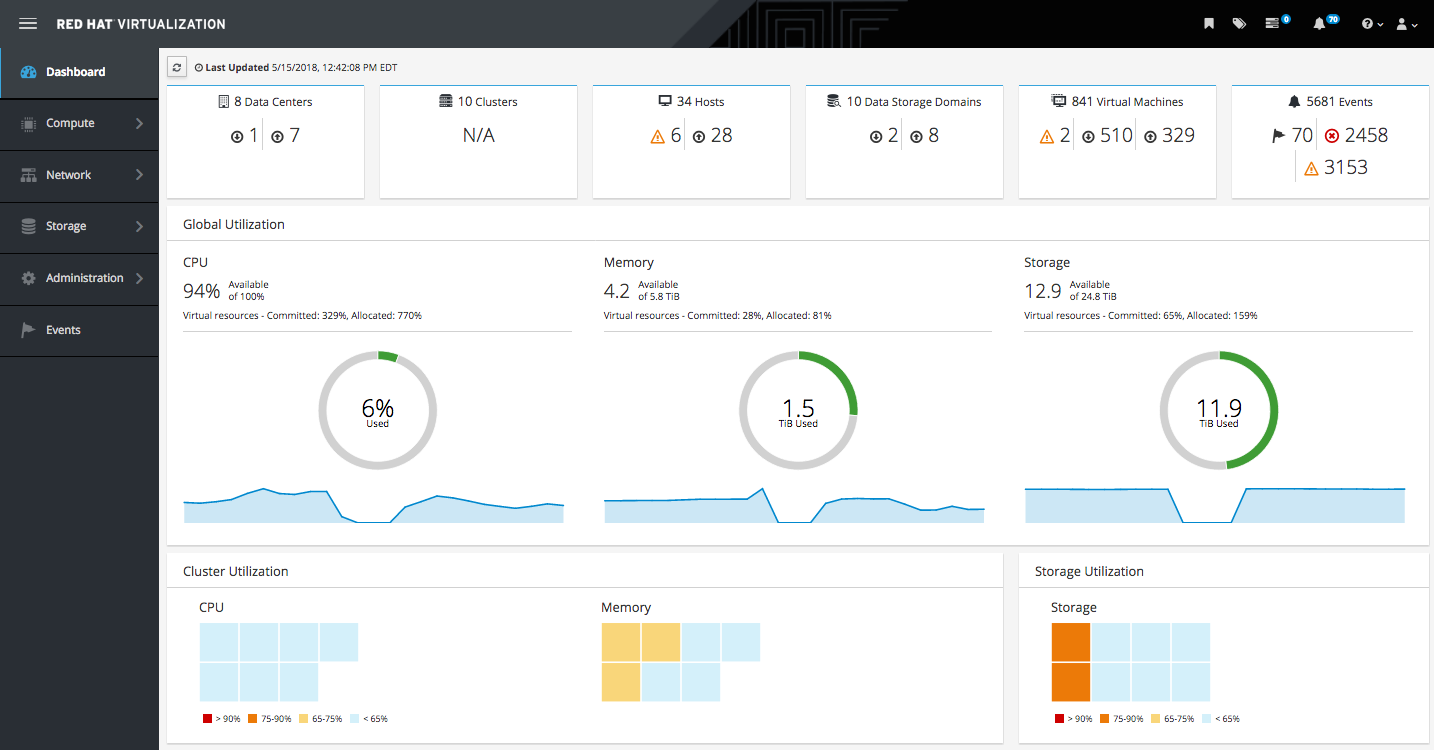
We enter strongly into the Red Hat’s world thru the Red Hat Virtualization Installation Services. In this guide, we will take you thru installation steps of Red Hat’s Virtualization platform. Following these steps will allow you to create a virtualized environment which complements your IT setup, improves performance and maximizes efficiency. Be it a novice in virtualization or someone who is familiar with the Red Hat products, this installation service will allow you to smoothly configure and deploy Red Hat Virtualization in your Organization.
Red Hat Virtualization allows you to host multiple applications without having to purchase multiple hardware, single hardware can host multiple virtual machines (VMs). This platform enables you to optimize your infrastructure, save money and cut down on management complexity. The Red Hat Virtualization solution employs the Kernel-based Virtual Machine (KVM) hypervisor, which is built into reliable Red Hat Enterprise Linux (RHEL) operating system.
Installing Red Hat Virtualization allows you to scale and secure the virtualization environment which can then be used to run critical workloads. Whether a test environment or an enterprise-wide solution, Red Hat Virtualization allows the installation and scaling to most workloads.
Key Takeaways:
What can you say is Red Hat Virtualization?
This provides a scalable and secure virtualization platform for business applications to be deployed on top of a virtual machine, in a nutshell, it’s an open source virtualization platform.
The heartbeat of Red Hat Virtualization is Kernel-based Virtual Machine or simply KVM hypervisor which is part of Red Hat Enterprise Linux or RHEL OS. It takes advantage of hardware virtualization features offered by recent processors allowing advanced and dependable virtualization. It is a cost-efficient system that risks failure by yielding a low grade of performance when hosting virtual machines.
It can be stated that Red Hat Virtualization provides good assurance in terms of performance and reliability, which can make it suitable for enterprise use since KVM is employed as the virtualization technology. Connecting it with RHEL provides fair dose of stability, security and ease to manage.
If you are in dire need of adjusting to current IT demands without compromising your hardware, then Red Hat Virtualisation is the way to go!
There are certain prerequisites that must be checked by the system before starting the Red Hat Virtualization installation. The process here involves first getting the Red Hat Enterprise Linux (RHEL) installed and configured on the host machine. The process therefore involves the following steps:
As soon as RHEL is on your host system, you may go ahead and install the Red Hat Virtualization Host Packages and set up the virtualization environment. This step will involve:
By completing these primary steps, beside ensuring Red Hat Virtualization is fully functional, you will be in a good position of creating virtual machines that will satisfy your enterprise requirements.
In order to use effectively the Red Hat Enterprise Linux (RHEL) 8 virtualization environment, it is essential to learn such fundamental components as: the aligned key elements and allow modules. This section will demonstrate how to enable the virtualization module as well as describe the basic components of RHEL Virtual Host
But before that, virtualization module should first be enabled in RHEL as Red Hat Virtualization cannot be used without it. This module contains the necessary components such packages and tools for virtualization. After that, the required packages for virtualization can be installed and configured on the host. In order to enable the virtualization module, do the following:
please restart your system.
Once you have enabled the virtualization module, it can be followed by the installation and configuration of the required Red Hat Virtualization packages on the host.
There are several key components that form a Red Hat Enterprise Linux virtual host and these components work as a team for the faster deployment of the virtualization environment. These components include:
Understanding these components will help users effectively operate in the RHEL virtualization environment.
The first thing to do before installing the Red Hat virtualization system is to verify that the hardware system meets the minimum requirements stated by the manufacturer. Red Hat in particular has the following specifications clearly stated as the absolute minimum for optimal performance:
Based on what is integrated in the RHEL, it is clear that Red Hat has adopted the KVM or kernel based virtualization machine implementation or hypervisor for its virtualization technology. There is no doubt that in order to effectively install and use Red Hat virtualization systems, one needs to have KVM virtualization systems support activated.
To check whether the KVM virtualization is activated, simply issue the command ‘egrep -c ‘(vmx|svm) /proc/cpuinfo’ from your terminal.
If the system returns a value greater than zero then it is certain that the machine is capable of virtualization. On the other hand, if the system returns 0 then the machines does not support a hardware level virtualization and so running any virtual machine will be a performance challenge.
Keep in mind that the process of enabling hardware virtualization support might differ from one vendor to another, as it is heavily dependent on the settings configured in your system's BIOS. If you have trouble adjusting these settings, check your system’s manual or get in touch with your hardware manufacturers.
Advantages of CLI
For advanced users, Command-Line Interface (CLI) provides a great deal of flexibility and enhanced power in the management of their virtualization environment in Red Hat Virtualization. With the CLI, you can automate functions, construct scripts, or even undertake intensive configurations, where necessary. It also supports remote management of the virtual machines, enabling use of essential features and settings that provide more straightened management of the virtualization environment.
With the help of the CLI, you can:
Hence, the good thing about CLI is the ability to perform bulk management of the virtualization environment in Red Hat Virtualization, hence increasing the overall efficiency and control.
Red Hat Virtualization Advanced Features through the User Friendly Web Console GUI Along with the CLI, Red Hat Virtualization has support for web management console GUI which is intuitive and visually appealing that allow management of virtual machines, hosts and storage resources with ease.
The web console GUI of the Red Hat Virtualization is made user-friendly without superficiality, for a better and complete control of one’s virtualization environment together with the robust functions available.
Red Hat Virtualization aims to ensure that all the necessary components are present on your RHEL host such that during installations, the hypervisor, the Red Hat Virtualization Manager and other critical elements of a Virtualization environment are available.
The steps involved are simple and precise and can be applied on a package manager based on the RHEL host. To install the virtualization packages, simply follow simple steps listed below:
After doing the basics of the installation of the Red Hat Enterprise Linux, the terminal on the RHEL host needs to be started.
The next step is to Update the package manager to the latest release via the command: sudo yum update.
To begin, install the virtualization packages using the command: `sudo yum install @virtualization`.
Next, install the qemu-kvm package for virtualization by executing the command: `sudo yum list installed | grep qemu-kvm`.
Further, install the Red Hat Virtualization Manager by using: `sudo yum install ovirt-engine`.
Now turn on the Red Hat Virtualization Manager service using the command: `sudo systemctl start ovirt-engine`.
Furthermore, on every boot enable the Red Hat Virtualization Manager service to start: `sudo systemctl enable ovirt-engine`.
After you finish completing these procedures, you can start working on the virtualization configuration and management on your RHEL host since virtualization packages will have already been installed.
In addition, let’s say you’re not experienced in carrying out installations. You can instead look to purchase virtualization services or hire a specialist virtualization installer service. These specialists will aid you in setting up virtualization as well as configuring it to cut down installation time.
Red Hat Virtualization technology also includes virtual machines (VM), which can be utilized to create various isolated copies of operating systems and applications on one physical machine. In this section, we will explore different methods for creating and managing virtual machines in Red Hat Virtualization.
The command-line interface is one of the best explanations to create and effectively manage VMs in Red Hat virtualization Command line interface has been constructed acquiring specific techniques to provide a user with a wide array of options. Here is a brief introduction to steps that need to be completed in the process:
Various VM management features including start, pause, and destroy commands will provide you control over th
Schedule a free architectural consultation with our senior cloud infrastructure engineers today.