
PowerMTA & Postal Deployments
High-volume MTA setup with virtual MTA pools, throttling pipes, and automated backoff rules for Gmail and Yahoo.


Need help with Roundcube installation and email setup service? Our team offers professional assistance to easily install Roundcube theme in cPanel.
Enterprise Mail Transfer Agents & Delivery Suites
Turnkey Email Infrastructure
Stop landing in spam. Our email delivery specialists build bulletproof self-hosted email infrastructure with automated IP warming and reputation monitoring.
High-volume MTA setup with virtual MTA pools, throttling pipes, and automated backoff rules for Gmail and Yahoo.

Full strict SPF, 2048-bit DKIM crypto keys, DMARC p=reject policies, and Google Postmaster Tools integration.

Gradual volume escalation schedules programmed to build positive sender reputation with major mailbox providers.

Automated handling of hard bounces, transient errors, and FBL spam complaints to keep contact lists clean.

Full campaign manager installation with tracking domain SSL, custom headers, and transactional API integrations.

Strict rDNS (PTR) matching hostnames and continuous real-time monitoring across 100+ global spam blacklists.

Send millions of emails per month for the flat cost of your VPS rather than paying per-contact SaaS fees.
Own your dedicated IP pool without sharing risk with bad senders on shared email networks.

Eliminate arbitrary third-party daily send limits and customize every header parameter to your exact campaign needs.
Starting at
single server setup
Order SMTP SetupStarting at
complete engine
Deploy Pro StackStarting at
per month / pool
Subscribe Delivery OpsSide-By-Side
| Feature | HostsCheap | SendGrid / Mailgun ($$$) | Shared cPanel Webmail |
|---|---|---|---|
| Monthly Cost for 1,000,000 Emails | ~$35 (Flat VPS) | $450 - $800/mo | Blocked by Host |
| Dedicated IP Reputation | 100% Dedicated | Paid Tier Only (+$90) | Shared with 1,000s |
| Custom DMARC & BIMI Setup | Included | Self-configured | Limited |
| Arbitrary Account Suspensions | Never (Self-Hosted) | Common Risk | Very High |
| Automated Bounce & FBL Handlers | |||
| Custom PowerMTA Routing Config |
We enforce strict cryptographic authentication and reputation safeguards to ensure mail passes rigorous modern ISP spam filters.
Customer Stories
“We were paying SendGrid over $1,200/mo for our SaaS notification emails. HostsCheap deployed Postal on a $40 dedicated box and our inbox rate actually increased.”
“Their PowerMTA configuration solved our Gmail spam folder nightmare. They set up proper IP rotation and backoff rules. Mail-tester score went straight to 10/10.”
“Setting up MailWizz with multiple SMTP servers seemed daunting until their team handled it in one afternoon. Running smoothly for over a year.”
Get top-notch IT support and web hosting services from HostsCheap. We specialize in VPS server support and provide roundcube support for your email needs. Get professional roundcube installation services including theme installation and email setup in cPanel. We provide expert roundcube email configuration setup service.
$300.00 USD One Time Setup Fee
GigID : ES-RWIS-606 Delivery 03 Days
HostsCheap provides you with roundcube webmail installation service. If you want your webmails to be more secure and provide multiple functions for its users, roundcube web email will surely fit into the need. It has already gained huge popularity in the market of webs which have led the users to search roundcubemail provider through various sources. Your first attempt at webmail was a success but now you're wondering how to install Roundcube PHP webmail on the same server as OfficeSuite Pro. Thankfully, at HostsCheap we can provide Roundcube installation on the same server, so let's get started!
✅ Roundcube webmail Installation
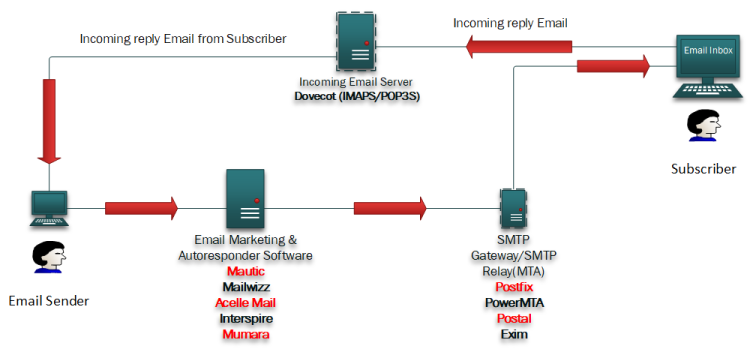
✅ Postfix and Dovecot & Mariadb vHost Installation
✅ 1 IP & 1 Domain Setup With Virtual Host
✅ Setup Multi Domain Control Panel
✅ Webmail for Email Reply & Forwarding
✅ SSL certificate Installation (Paid SSL | Free SSL )
✅ SPF Setup similar with Existing Configuration.
✅ DKIM Setup similar with Existing Configuration.
✅ DMARC Setup similar with Existing Configuration.
✅ rDNS Setup.
✅ Spam Filter setup if Requirements!.
✅ Firewall and Fail2ban Configuration (ssh)
✅ Report 10/10 score on mail-tester.com (IP & Domain No Blacklist )
Are you in search of a roundcube webmail installation which isn't too cumbersome? Then you don't need to worry as we have available Roundcube webmail install service that would allow you to make use of this amazing web based mailer for all your tasks whether you are a business owner or just an individual as our professionals will be doing all the work for you.
We have been in this field for a considerable amount of time and say this with certainty that a roundcube web mail installation isn't the most difficult thing to do, and should be a breeze providing you maximised support from its myriad of features. In addition to that our other services include step by step guides that will help you set up multiple identities and send and receive any MIME or HTML messages through our service. Our roundcube hassle installation process will surely change how you view email.
Key Takeaways:
Roundcube Webmail is a multilingual and IMAP-enabled browser that has an interface that resembles an application. It handles multiple solutions perfectly. From implenting MIME to develiping HTML messages, allowing multiple sender accounts, having a nearly fully automated address book, listing the messages in threads as well as checking spelling. All of it and more is what this webmail client can do. Now, use of roundcube is widespread globally because its free, open source and its interface is easy to use. All of which are purely written in PHP and stored on the wide web, providing a very reliable email service.
Roundcube Webmail is a small portable application that can access and manage your emails from any corner of the world as long as there is an internet connection. Being an open source software means it is free to use and anyone is allowed to make changes to the application. Roundcube is able to enrich the users experience with an email client that can cater for multiple formats of messages, advanced book management and it an elegantly connects with other email solutions.
Employing Roundcube Webmail as your email client has many advantages. For one, it has a simple and self-explanatory interface that simplifies and enhances email tasks. This interface offers a look and feel that is similar to that of a regular desktop program. Roundcube integrates functionalities such as drag-and-drop inbox management, full implementation of MIME and HTML-skinned messages and multiple manager identities round out a rich email package.
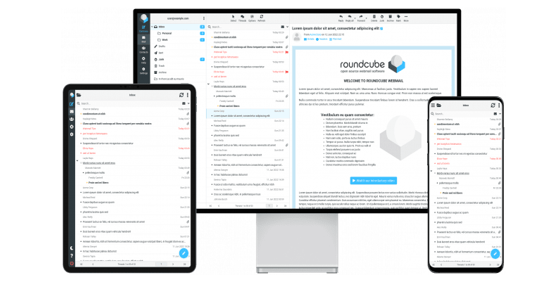
Furthermore, this webmail also allows you to upload your messages no matter where you are, provided you have an internet connection. The portability and ubiquitousness of Roundcube makes it a perfect webmail client for people who are frequently on the move. Roundcube web interface turns responsive so it’s not a problem to use this application on a computer, smartphone or a tablet.
Whenever a user first signs on to Roundcube, they see a UI centered around ease and usability while also being reminiscent of desktop software. Some of these are as follows:
Understanding how Roundcube operates in terms of UI makes it easy for the user to understand the webmail client. Beginners and advanced users alike will be able to work on their emails without any hassle.
There are a few preconditions that must be satisfied before installing Roundcube. For example, Roundcube is a web based mail client that will demand the presence of a web server such as Apache or Nginx. It also needs a web server, because it has been coded in PHP, along with a mysql-based storage such as MariaDB to store email-related data.
Server prerequisites for Roundcube
Make sure that your server fulfills at least the following prerequisites before you continue with the installation Roundcube:
Change access to the server configuration files and the rights necessary to install applications
Servicing purposes and proper functionality of Roundcube requires some specific modules to be available on the server. These modules are:
Before you move on to the installation of Roundcube, confirm that the aforementioned PHP modules have been installed and set up correctly on your server.
Also, the configuration of the Roundcube’s database includes creating a database and a user for Roundcube. You will also need to set up the permissions and privileges which will allow the Roundcube. For the general proper way of setting up the database have a look at the documentation of Roundcube.
Security Patches and Long Term Support The Roundcube Company focuses on ensuring the security of their free webmail client by performing regular security patches. These updates are critical as they help prevent roundcube mail from being compromised or exploited and also serve as backups to your stored data: emails. Moreover, Roundcube has LTS versions that receive patches and updates thoroughly on security fixes and critical bugs. LTS version does indeed have its advantages as well, as it is sweet spot for those who seek out stability and low maintenance, as well as businesses. Always remember to apply the latest Roundcube security patches in order to protect your roundcube email system.
To make sure that the downloaded Roundcube package is genuine, the developers provide PGP signatures, which also make sure that the package downloaded is untampered and comes from them. These signatures can be found on the Roundcube GitHub releases page. To authenticate a package with PGP signatures, you can obtain the public key from the pgp.mit.edu keyserver or the Roundcube webpage and use the GPG command line. Using PGP signatures to confirm the validity of a package also improves the protection of your Roundcube installation by giving it a further layer of security.
It is recommended to hire professional installers if you wish to avoid the hassle of setting up Roundcube by yourself. Their expertise will guarantee that the installation process goes smoothly, and Roundcube is properly configured. This allows you to redirect your focus to your business or life's priorities without compromising anything valuable. Opting for an expert to assist you allows Roundcube WebMail to be setup seamlessly with no difficulties whatsoever.
Using Docker provides a much straightforward and easier process to deploy the Roundcube on multiple machines instantly and all at the same time. With the use of Docker, one simply has to create a Roundcube image along with its relevant dependencies, and the image can be run anywhere Docker is installed. With that being said, a simple sit of adjustments will have to be made. Deploying Roundcube has been made easier with the use of docker, which helps streamline multiple environments. Docker has also made it easier to add and manage multiple instances of Roundcube. Due to its simplicity and accessibility, developers and system administrators are the primary users of docker for Roundcube deployment.
Encore une fois, Roundcube pourra être déployé grâce à Kubernetes qui est une plateforme open source d’orchestration de conteneurs, il est en effet possible d’utiliser des Helm Charts pour déployer Roundcube. Les Helm Charts sont une partie qui peut be quite interesting for those who are not fond of the system. Helm Charts permettent de simplifier l’aspect complexe de la configuration requise pour Roundcube ainsi que certaines de ses dépendances. They also makes it easier to deploy and manage Roundcube instances. Les organisations qui auraient besoins d’un client webmail qui devra s’équiper d’un grand nombre d’utilisateurs ayant des coordonnées électroniques leur permettant de faire une grande variété d’options seront parvenues en utilisant Helm.
Roundcube can easily work with LDAP address book, mobile devices synchronization, and be interlinked with Active Directory improving in many aspects end user experience and email account management, enabling users and organizations to fully utilize Roundcube features. This perfect integration and compatibility makes Roundcube a good solution especially for organizations who already have existing email solutions and don’t want to get rid of them, but rather improve their email management systems.
Roundcube has better easiness in comprehending and comprehensiveness in modification in comparison to other relevant webmail interfaces.
Roundcube is a robust webmail client in spite of the lack of PGP and encryption capabilities. The client does offer features like:
These features help firms and individuals communicate through addresses in a more systematic, organized, and efficient manner. Roundcube is also well known because of the ease of use and degree of customization it allows users to have.
Roundcube comes with a good amount of customization abilities, one of which is skins. There are various ways to alter the appearance of Roundcube webmail client and this is one of them. But why would you do this? A broader audience that has better articulation and communication would do it as each roundcube skin symbolizes a person’s style. Customization allows having a center of attention with bold, cheerful themes or go businessway and select professional ones. Skin customizing is another level of altering a user experience and is very fun.
Apart from the customization capabilities, RoundCube also has a plethora of additional plugins that can be used to increase its capabilities and features. With the use of plugins, you will be able to add features such as email management, encryption, advanced search, and third-party services. It is easy to install and manage them through Composer, and they are readily available in the Roundcube Plugins Repository. Thus, you can further improve your webmail client by adding other Roundcube plugins that will help in customization and tweaking of webmail clients to your liking and requirements.
The first thing you need to do if you would like to install roundcube is to download the appropriate roundcube package. So how do you do that? You may do the following:
So now that you’ve acquired the Roundcube package, let’s configure the Roundcube’s database. Follow these steps below:
On your web server create a database for Roundcube. MySQL, PostgreSQL or anything of your preference is fine.
Create a user for the Roundcube database and make sure to assign the right privileges.
Add the Roundcube configuration files with the relevant database configuration details — the database name, username, password, and host.
One of the most important steps towards a successful installation of RoundCube is setting up the database properly. Refer to the Install and configure your Roundcube based webmail documentation for assistance in setting up the database configuration.
Roundcube provides you with an enviable array of email management features that can make you more productive. There are different features available that can help you to be more proficient in email handling in Roundcube which makes browsing through your mailbox and sending out emails easier and faster.
One of the clickable features available in Roundcube is the advanced search that enables users to locate a particular email or messages by specifying a sender, subject, or keyword. Additionally, another tool named email filtering allows users to automatically sort emails based on different criteria into a number of folders which makes it possible for them to manage their inbox messages with ease. Another function of Roundcube is message tagging, which assigns tags or markers to senders or emails, making it suitable to use even when looking for important messages that do not need to be deleted. Lastly, another useful feature built into Roundcube includes folder organization features that can be designed to create folders and subfolders where users are enabled to arrange their emails in ways they deem appropriate.
The capabilities mentioned earlier are rather substantive Roundcube’s email management features. Roundcube also has got shortcuts, as well as user friendly interface elements which are likely to improve management of the emails. There’s a shortcut for quickly undertaking everyday tasks such as archiving or deleting emails, which can be done without wading through layers of menus. Yet another example is in the drag and drop message management, marking the user friendly interface elements, where one can move, copy or forward messages by dragging them to their respective folders.
Roundcube provides a bare minimum of email management functionalities which can be enhanced further with advanced features such as PGP (Pretty Good Privacy) encryption. PGP encryption offers a means to encrypt as well as decrypt the messages that you send across emails. Because email contains naked and sensitive information, this feature controls who can read the emails sent through the system. This added level of security simplifies and fortifies your secured communications. By digging deeper into wishing ones of PGP encryption in Roundcube, users can use and satisfaction know that their emails are in safe hands.
It is a plain fact that upgrading your Roundcube installation is a necessary maintenance activity if you want the newer features, bug fixes and patches to be applied for your system. When conducting research on Roundcube, keep in mind that the method frequently has trouble, and this is addressed. And this is why there are newer and updated versions of the application periodically. It is also critical for you to appreciate the need to remain abreast with releases so that you can determine the right moment of making upgrades of your Roundcube connotation.
Step3: Visiting the particular web page
Launch your dedicated high-deliverability email infrastructure with our senior email architects today.