
PowerMTA & Postal Deployments
High-volume MTA setup with virtual MTA pools, throttling pipes, and automated backoff rules for Gmail and Yahoo.


To Setup Google Workspace DKIM DMARC SPF with the best practices. Get expert MailChimp and Mailgun DMARC setup services for enhanced email security.
Enterprise Mail Transfer Agents & Delivery Suites
Turnkey Email Infrastructure
Stop landing in spam. Our email delivery specialists build bulletproof self-hosted email infrastructure with automated IP warming and reputation monitoring.
High-volume MTA setup with virtual MTA pools, throttling pipes, and automated backoff rules for Gmail and Yahoo.

Full strict SPF, 2048-bit DKIM crypto keys, DMARC p=reject policies, and Google Postmaster Tools integration.

Gradual volume escalation schedules programmed to build positive sender reputation with major mailbox providers.

Automated handling of hard bounces, transient errors, and FBL spam complaints to keep contact lists clean.

Full campaign manager installation with tracking domain SSL, custom headers, and transactional API integrations.

Strict rDNS (PTR) matching hostnames and continuous real-time monitoring across 100+ global spam blacklists.

Send millions of emails per month for the flat cost of your VPS rather than paying per-contact SaaS fees.
Own your dedicated IP pool without sharing risk with bad senders on shared email networks.

Eliminate arbitrary third-party daily send limits and customize every header parameter to your exact campaign needs.
Starting at
single server setup
Order SMTP SetupStarting at
complete engine
Deploy Pro StackStarting at
per month / pool
Subscribe Delivery OpsSide-By-Side
| Feature | HostsCheap | SendGrid / Mailgun ($$$) | Shared cPanel Webmail |
|---|---|---|---|
| Monthly Cost for 1,000,000 Emails | ~$35 (Flat VPS) | $450 - $800/mo | Blocked by Host |
| Dedicated IP Reputation | 100% Dedicated | Paid Tier Only (+$90) | Shared with 1,000s |
| Custom DMARC & BIMI Setup | Included | Self-configured | Limited |
| Arbitrary Account Suspensions | Never (Self-Hosted) | Common Risk | Very High |
| Automated Bounce & FBL Handlers | |||
| Custom PowerMTA Routing Config |
We enforce strict cryptographic authentication and reputation safeguards to ensure mail passes rigorous modern ISP spam filters.
Customer Stories
“We were paying SendGrid over $1,200/mo for our SaaS notification emails. HostsCheap deployed Postal on a $40 dedicated box and our inbox rate actually increased.”
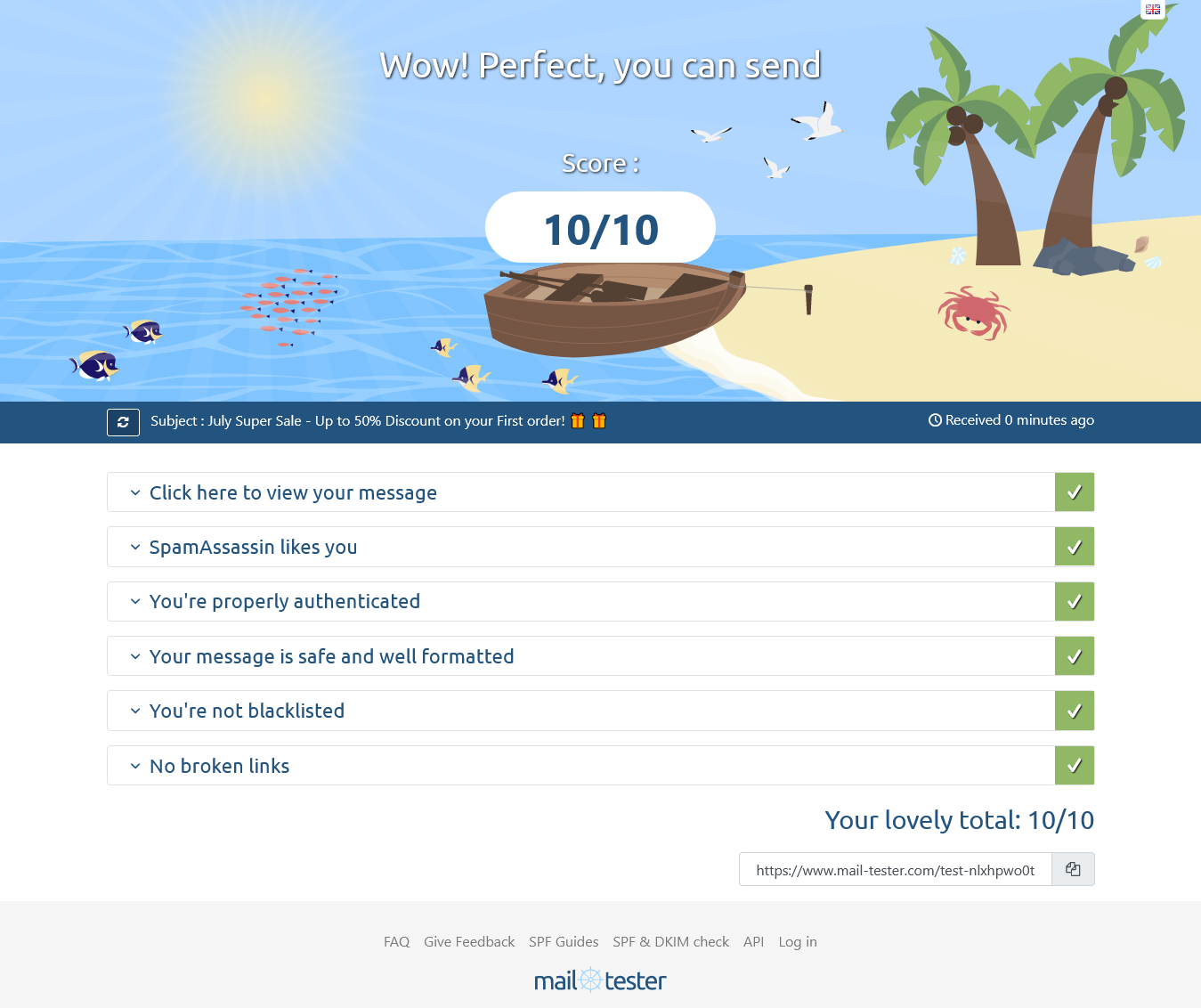
“Their PowerMTA configuration solved our Gmail spam folder nightmare. They set up proper IP rotation and backoff rules. Mail-tester score went straight to 10/10.”
“Setting up MailWizz with multiple SMTP servers seemed daunting until their team handled it in one afternoon. Running smoothly for over a year.”
Google Workspace DKIM DMARC SPF
Secure your Google Workspace email with DMARC authentication to prevent spoofing and phishing attempts. DMARC, SPF, DKIM Setup Service.Explore best practices for implementing Google Workspace DKIM DMARC SPF to secure your email communication. Learn how to set up DMARC with Mailchimp and Mailgun.

$90.00 USD One Time Setup Fee
GigID : EDC-GWDVS-502 Delivery 03 Days
Google Workspace is the best collaborative tool. It includes email, video meetings, calendar and documents that can be shared within your business or shared with clients. Whether you're a small business person with sales reps traveling across the globe, a busy sales rep in an office who needs to send and receive instant messages and calls, or a large multiple site enterprise that requires employee collaboration, cloud email, calendar and document management tools can help you be more productive. Businesses of all sizes rely on the productivity and collaboration tools in Google Workspace. With a premium cloud-based user interface, this suite of apps is built to help your business thrive. With features like Google Calendar integration, integrated team communication via Gmail, and Google Docs support for customizing views on documents, it's easy to stay organized across devices and in an easy-to-use way.
✅ 1 Domain Verification
✅ Setup SPF/DMARC and all others required records.
$100.00 USD One Time Setup Fee
GigID : EDC-DVS-501Delivery 03 Days
Having your domain verified is a great way to go if you want to send email campaigns from your verified domain. This is because having your domain verified adds the complete email verification process on top of what DKIM and SPF already provide. Domains are the heart of a website and if you’re looking for ways to improve your email deliverability, we can help you. Setting up Domain Verification on an Email Application can allow you to send email campaigns from your verified domain. This can help improve your deliverability and is a great way to make sure your email is delivered to the inbox of each recipient by another business or organization. Domain verification is an awesome way to boost your deliverability. With this feature, you can verify your domain's MX records so that your emails will be delivered to users who have registered for your service or subscribed to your blog. This service also provides a secure connection that enables you to use third-party email providers like MailChimp or Campaign Monitor.
✅ PowerMTA
✅ Mautic
✅ Acelle Mail
✅ Sendy
✅ Mailwizz
✅ Mailchimp
✅ Mailgun
✅ Getresponse
✅ Aweber
✅ Campaigner
✅ iContact
✅ Campaign monitor
✅ Constant Contact
✅ Hubspot
✅ Sparkspost
✅ Infusionsoft
✅ Sendinblue
✅ Marketo
✅ Activecampaign
✅ Klaviyo
✅ Pardot / Salesforce
✅ Sendgrid
I hope this articles guide will mirror what you were specifically looking for. DMARC for google workspace and g suite are always the most popular requests in the secure email domain space because google services are widely used. As the increasing rate of email spoofing and phishing attacks continue to plague the email society the ability to combat such deceptive mal practices becomes vital. This ability is provided by DMARC whereby one is able to verify the authenticity of emails through particular protocols and protect oneself from malicious activities.
To explain it briefly we will first cover the issues related to DMARC basics, its position in the email authentication regime as well as how DMARC authentication protocol helps defend the modern society from email spoofing trying to take new forms. After we tackle these issues we will be focused on why is DMARC particularly necessary for google workspace users and how it prevents phishing over the range and gives the guarantee of prevention to any relevant emails from being discarded by spam because of overzealous AI algorithms.
Finally, we will guide you on how to get ready for the adaptation of the DMARC model as this stage as well as overriding SPF and DKIM authentication will provide you good grounds to do so. These are preconditions for the disarmament of DMARC meaning that these protocols will make your email authentication practices more effective. Additionally, we will demystify the purpose of DMARC reports for email authentication practice and their monitoring.
We will provide a comprehensive procedure on how to configure DMARC Within Google Workspace Services. Whether the focus is on reaching the DNS settings for the domain, or DMARC TXT Record creation, you have our support at every stage of the configuration process.
Formulating a robust DMARC policy for your domain is also a priority and we will provide an outline of key DMARC policy tags and what they do. You will widen your horizon in terms of knowledge about DMARC record values and parameters setting, so that DMARC policy meets the set objectives.
Proper verification of DMARC settings is important for the performance of this structure as we will focus on the need for consistent supervision and revision. In addition, some common DMARC setting problems and their solutions will be dealt with.
Reading and managing DMARC reports is an integral part of email security and we would like to focus on the possibilities it opens up. At the same time, we would outline the performance benefits that adopting DMARC would offer which includes better delivery rate as well as reduction in the chances of spear-phishing attacks.
As much as the role of DMARC in securing emails cannot be overstated, we will consider other issues having a bearing on security apart from DMARC such as email encryption and advanced threat protection.
Finally, let's walk you through configuring the DMARC for Google Workspace Services, providing the steps for using the Google Admin Console and completing the configuration. We finish this section by reminding everyone that it is important to ensure full protection of emails by advocating for the deployment of DMARC and the subsequent actions after deployment of DMARC.
This section answers the basic questions about what DMARC is. DMARC, which is an acronym for Domain-Based Message Authentication, Reporting, and Conformance, is an important technology for email validation. Through DMARC, domain owners are able to set policies that outline which authentication methods are to be used during the configuration of messages. This policy setting averts impersonating emails or rather spoofed emails.
One of the phishing methods used to deceive people is email spoofing. However, when they decide to implement DMARC, domain owners will have the opportunity to provide their own 'email' and this will prevent potential phishing attacks as it improves email security.
DMARC would also provide the reporting and conformance options. The reporting part has great value because it tells about email authentication failures while the conformance goes with the policy in force.
The importance of email security cannot be stressed enough, especially by Google Workspace users in the modern era. For your enterprise to be on the safe side from the threats of email spoofing and phishing attacks, Domain-based Message Authentication, Reporting, and Conformance (DMARC) has to be put into effect. With DMARC, spoofing emails from your email address is impossible and this keeps your messages delivered instead of being flagged as spam.
Email Spoofing and Phishing: Email spoofing can be defined as the forging of the senders address such that once the recipient receives the Email, he or she is led to believe that the mail was sent from a trusted source. This is mostly seen in phishing, when users are deceived into providing their personal information or downloading harmful attachments. If DMARC is put into use, the chances of this happening are greatly reduced and ensures that your organization's confidential information stays protected.
Never Let Your Emails Be Labeled As Spam: Email filters determine which emails a user receives directly in their inbox and which ones are sent to spam. If proper verification procedures are not enforced, any legitimate emails coming from your domain are likely to get flagged off as spam and will never reach their intended recipients. If DMARC is set up properly guess what, you are asserting your domain as valid and there are high chances your emails inbox instead of the spam folder.
Such information above allows Google Workspace users to boost their general email security with the use of DMARC protocol. DMARC ensures that recipients of emails do not open messages marked as spam and fall for phishing emails as only authentic emails from verified domains are received in the inbox.
For one to be able to configure DMARC, their domain must be well configured. DMARC implementation is seamless as long as SPF and DKIM are in place. The SPF and DKIM protections are necessary for DMARC to work well, as well as contributing to the overall security of email_sent_messages.
Configuring your domain’s SPF and DKIM should be the first concern when planning on using DMARC. SPF elimination of email spoofing through indication of what IP addresses are allowed to send emails in the name of your domain. DKIM goes further safeguarding the message through cryptographic signatures and signing of emails so that recipients can make sure that the message remained intact throughout a journey in the network.
To configure SPF for Integrated services that are associated with Google Workspace do the following:
Follow the instructions and add the suggested record to your domain's DNS settings.
Setting the DKIM configuration for your Google Workspace is also easy as pie:
By setting up DKIM along with SPF for your domain, you are allowing yourself to implement DMARC on a secure foundation with clean pots.
DMARC_reports are used in conjunction with DMARC’s main role of reporting email addresses which do not pass authentication. So, each time you start using DMARC, remember to keep an eye on the email authentication through the DMARC reports.
DMARC reports contain information on failed authentication, such as emails, ip addresses, and domains. Periodic reading of these reports allows the monitoring of undelivered and incorrectly delivered emails aimed at obtaining fraudulent purposes including phishing attacks and email spoofing.
Certainly, the ability to view and analyze these reports can consequently enable you to appreciate the level of email authentication on your domain as well as improve the security posture of email sent from your domain.
Comprehensive Guide to Implement DMARC for Google Workspace Account
Getting to the DNS Records in your Domain
In order to complete the DMARC configuration for Google Workspace services, DNS records of your domain must be changed first. To find these settings, please proceed as follows:
After accessing the DNS settings of your domain, you can create a DMARC TXT record as follows:
Find the section which allows the creation of the new DNS record of type TXT.
Type in your domain’s name in the Host or Name field (for example, in the textbox enter example.com).
In the Field Value or Data field write in the correct form of the value of DMARC such as the following one: In the example set format of DMARC record in a manner as illustrated below: v=DMARC1; p=quaranitne; rua=mailto:reportr@dlmb.eu.com; pct=100;
It is crucial that you substitute ‘example.com’ with your registered domain name and ‘reports@example.com’ with whichever email address you would like to get DMARC reports on. Set the value of the p tag to your preferred DMARK policy (none, quarantine or reject). The pct tag specifies the percentage of messages to which this policy will apply, i.e. to what portion the policy would be implemented.
After you have done the saving of the set values of the DMARC TXT record, make sure you save the changes. The new DMARC record can take some time to propagate around the DNS system. This usually requires a few hours but can take up to 48 hours to update.
Setting Up SPF and DKIM: Prerequisites for DMARC In regards to the successful application of DMARC, it is imperative that you put in place mechanisms of authentication for your domain sending policy framework, SPF and signing emails with your domain policy DKIM attributes. These measures are very crucial in determining the authenticity of email messages sent from your domain and therefore increase the effectiveness of DMARC.
SPF Setup:
As for SPF (Sender Policy Framework), it is an Email authentication method that allows domain owners to indicate which servers are allowed to send email on their behalf. So when you set up SPF you actually create a list of allowed domains or IPs that can send emails on your behalf. This makes it more difficult for spammers to send emails with your domains and thus combating email fraud and improving the chances of getting emails through.
DKIM Setup:
With DKIM (DomainKeys Identified Mail) it’s a lot easier because all you are doing is attaching a digital signature to the email. This signature is created through the encryption process, giving them a “cryptographic proof” that the email is from their domain and hasn’t been altered in any way on its way. With DKIM one can assure that formal emails from the domain are sent with integrity and trust which makes email security ever more reliable.
Do note that when you consider doing the configuration for DMARC it is requisite to first go through with SPF and DKIM configurations since both of these need to be working perfectly. Having done so allows the first two to have email validation conditions that will allow DMARC to check if the incoming emails are authentic, thus enabling the defined DMARC policy for your domain.
This section focuses on establishing the most crucial DMARC Policy necessary for your domain. DMARC policy definition is important to every organization who wishes to protect their domains from spoofers and phishers. The correct configuration of the key policy tags is necessary for the inclusion of a DMARC policy. This understanding helps create a strong email authentication system.
A domain policy or DMARC policy dictates how your email domain is authenticating your emails. Here are the key DMARC policy tags and how they serve.
p (policy) tag: Appearing in all DMARC pages and reports – p indicates the implementation policy for email messages which have failed authentication. To put it simply, it provides an equal provision which allows you to set forth a policy, such as none, quarantine, or reject. The significance of this tag cannot be overlooked as it helps lay founding pillars for establishing a strong DMARC policy.
rua (reporting URI) tag: The rua tag on the other hand specifies the URI where aggregate reports need to be sent. Thanks to these reports, a lot of information can be gathered concerning a particular email domains authentication activity through which one knows what went wrong and which holes appear to be an easy target for any potential threats to the domain.
pct (percentage) tag: Using the pct tag, you can define a percentage of emails that the DMARC policy will be applied to. This tag is aimed at helping you phase the DMARC implementation in order not to interfere with email delivery while tightening the level of security measures over time.
These DMARC policy tags are fairly easy to understand and once configured properly, will help enforce your DMARC policy that corresponds to your email policy objectives and shields your domain from abuse.
This section details how to specify the values and parameters of a DMARC record. In order to set up the DMARC policy correctly the following together with the components: the v (version) and the p (policy) tags and the rua (reporting URI for aggregate reports) tag for identifying report recipients.
Setting Up the ‘v’ and the ‘p’ Tangs
The ‘v’ tag indicates th
Launch your dedicated high-deliverability email infrastructure with our senior email architects today.